

I can't get anywhere. I have a 160 GB pushbotton external hard drive, seagate brand, connected with a 2.0 USB. It worked fine, then all of a sudden when I tried to open it all I got was an I/O device error. At first people told me this was a registry problem, but when I tried plugging it into other systems the same error popped up. Strangly, the drive used to read E, but now reads as G. I don't think this is entirely the cause of the problem though, because when I tried plugging this into other systems it read E, but still with the same I/O device error. I have Windows XP on an HP notebook, and I am clueless. I tried disabeling the device, re-enableing the device, uninstalling the device and reinstalling the device. I tried a registry cleaner but it only cleaned 50 problems. I purchased a new cable and that didn't work either, and plugged both cables into all 4 of my USB ports. I bought System Mechanic 7 Professional, only because I live in a small town and Wal-Mart is the only place to buy software.
Is there a solution? Does any one know what an I/O device error means? Can I retrieve my information? I'm willing to drive very far and buy very expensive software to do this, so please tell me if there is any software that can help. Also, please tell me if there is any basic thing I can do to help.
- Asked
- Updated
- Viewed
- 337.7k times
50 Answers
-
Votes
-
Oldest
-
Latest

- Answered
- Updated
It has nothing to do with the registry and it doesn't matter what drive letter windows assigns it. It sounds like something corrupted the file system on the external drive. That's why you're getting an Input Output error.
What is the exact error message?
- Answered
- Updated
G:// is not accessible.
The request could not be performed because of an I/O device error.
This occurs when I try to open the drive.
- Answered
- Updated
That drive is corrupt for one reason or another. If you want to take a long shot, you may be able to mount the drive on a Unix box or try something like the Ultimate Boot CD.
Also, you could search for data recovery software, in which I don't have much faith, but who knows?
- Answered
- Updated
Well that was the answer I was sort of fearing and expecting as well. Is there any way I can wipe the hard drive to make it useable again?
- Answered
- Updated
I just thought of something. I never tried it on a external drive but you might try the manufacturer's diagnostic tools. In most cases, you can d/l them from their site and create a boot disk. Boot the machine. If it sees the drive, run the tests on it. It may have a repair option.

- Answered
- Updated
hey i have a similar problem i have a 4 gig sd card that i keep getting and i/o device error and nothing i try seems to work

- Answered
- Updated
HI
I have the same problem I got I/O device error when I try to transfer file form my external HD to my computer. it happen to any computer.
So I guess the Ext HD is the problem.
I run Regcure and follow protocol (ATA/ATAP en PIO Only) to fix this problem but nothing.
I have a lot of stuff on my ext HD so how can I fix my ext HD.
thanks

- Answered
- Updated
I believe I stumbled upon a fix to this and just wanted to go around making sure people know how to fix this ridiculous problem.
open up the cmd prompt
I haven't had this happen with Win 7 so I'm not sure about that one
older version of windows select RUN from start menu and type cmd
from there type "chkdsk X: /f" no quotes and replace X with whatever drive it is.
It should perform a scan and once complete should work just like new!
YAY!!!!!!
Peace, Love, Harmony

- Answered
- Updated
OMG!! ICaseI... I LOVE YOU!! This worked!!! i had so much info on my old HD that had failed. i put it in an enclosure and hooked it up thru the USB port and everything was great until, when trying to access the drive, i received the dreaded "not accessible. ... I/O device error" message. i did try a bunch of other things... and fortunately i stumbled across your post. and it's incredible that you just posted this yesterday. thank you SO much! and thank you OZZU for this site!
YAY!!
Peace, Love, Harmony ... and i'll add Freedom to that list

- Answered
- Updated
Dear cmd solution expert: I tried your solution, typing the following: chkdsk E: /f (By the way, what does the "f" stand for?)
Unforunately, I received an error: "Cannot open volume for direct access."
I tried using this command when the external drive was plugged into my laptop's USB port. I also tried it when it was not plugged into the port.
My issue still persists...My external drive cannot be read on account of an error when I attempt to use any one of the four USB ports: "E:\ is not accessible. The request could not be performed because of an I/O device error."
Any further assistance would be appreciated. I'm not prepared to buy a new laptop and I cannot replace the data that is on my drive.
Thank you.

- Answered
- Updated
Hi, i have a 4gb memory stick. When i connect it to my laptop, "my computer" starts to not respond. "I:/ is not accessible. the request cannot be performed because of an I/O device error" comes up when I try to go into it. I have run a scan on it already but the result was tat there was no infection in it. Is there any way this can be fixed, preferably without formatting it?
- Answered
- Updated
just tried that chkdsk thingy and got the same result as gbohn! i seriously need that stuff on the stick... anyone have any suggestions?
thanks!
- Answered
- Updated
how ? found directions on how to fix that problem with "chkdsk" but don't understand ha;f of the directions lol! haven't done it properly yet tho..
what is the likelihood that i will be able to recover the files?
- Answered
- Updated
100%

- Answered
- Updated
I was having the exact same i/o device error problem with my 1TB iomega external hard drive.
This is no joke but i fixed the problem by picking the hard drive up and shaking it and turning it on upside down..... it seems to be working just fine now, seriously! Give it a try

- Answered
- Updated
hello there... well am getting the same error as above mentioned not able to fix it. gimme any suggestion except to throw my memory stick away n asking me to send the card to u 😁 wud appreciate any help thank you

- Answered
- Updated
I was having the same problem with a new SD 4Gb memory card. After using the cmd prompt suggestion, still having problems. I was trying to use a small portable card reader (like a flashdrive). With a little more detective work I noticed that the newer, higher capacity memory cards are actually in a SDHD format. Very similar, but not recognized by my reader. Easy fix: use a reader which includes the new SDHD format. Good Luck!!!

- Answered
- Updated
Hi.
I am having the same I/O device error with my 250GB Seagate portable HD.
Here are what I have tried so far:
1) Did a virus scan only to find the device virus-free.
2) Plugged in to 2 computers (on different occassions) but experienced the same error.
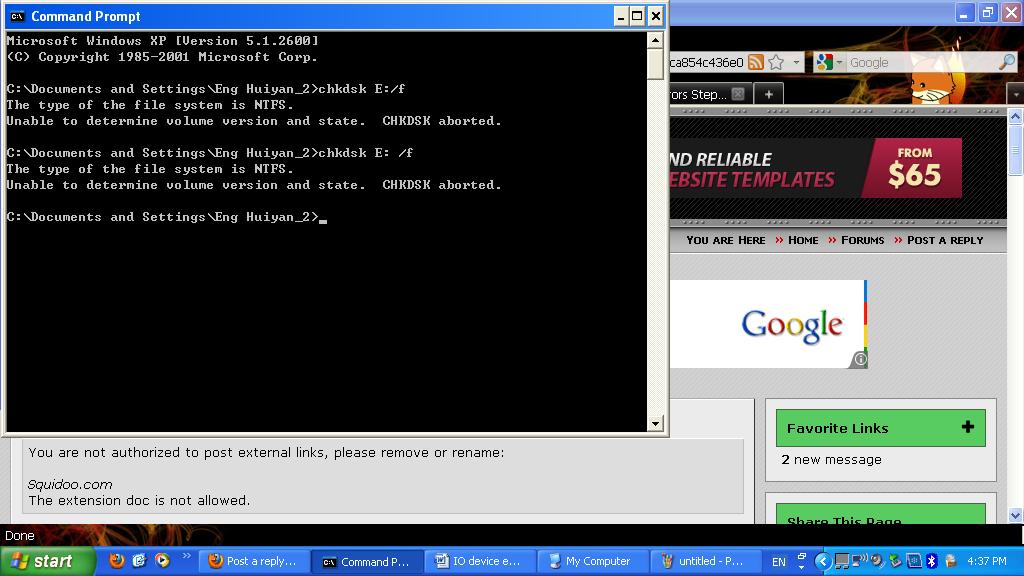
2) Tried to fix the issue using the Device Manager method found on this website: "How to fix I/O Device Errors Step-by-Step" on Squidoo. Am not sure if I selected the correct device but the I/O device error still persisted.
3) Tried the cmd method but the chkdsk was aborted for some reason(Please refer to PrintScreen attached).
4) Can't find the Registry Cleaner on both of my computers - Window XP & Windows Vista.
Any advices would be greatly appreciated.
Thanks in advance! 🙂

- Answered
- Updated
I have a seagate 500gb external.. also tried the chkdsk method but its telling me that its a RAW drive and it cannot be accesed, what does tha mean..?
Any help would be awsim!

- Answered
- Updated
I joined this community just to thank IcaseI. I did exactly as he mentioned..and it worked.
I've a 250GB WD external drive. It wasn't reading. It was making those clicking sounds right after being plugged in. I disconnected connected it a 50 times at least. I checked on many forums.All suggested a checkup at some computer center. I had some 100gb of data..and all work. I was thinking how much would i spend..would i get the data back.blah. And then i came across this forum..and IcaseI's post.
And it works!
Yay!
THank you!!!!!!!!!!

- Answered
- Updated
Hi, I may have a silly solution - I am no techie so apologies if this does not work for you.
I had an I/O error too with my usb key. I couldn't reformat the key, open it, view files etc.
I tried all the solutions above incl chkdsk etc but that failed too.
Then by chance as a last measure of desperation, I tried the USB key on my girlfriend's computer (Vista, like mine) and the key worked immediately and perfectly!!
I then put the USB key back in my PC, and it started to work (and continues to work) perfectly!!
The USB key in question ia a SANDISK Cruzer Sync 8GB Titanium.
Hope this works for you.
Regards,
Tony

- Answered
- Updated
I can't get anywhere. I have a 160 GB pushbotton external hard drive, seagate brand, connected with a 2.0 USB. It worked fine, then all of a sudden when I tried to open it all I got was an I/O device error. At first people told me this was a registry problem, but when I tried plugging it into other systems the same error popped up. Strangly, the drive used to read E, but now reads as G. I don't think this is entirely the cause of the problem though, because when I tried plugging this into other systems it read E, but still with the same I/O device error. I have Windows XP on an HP notebook, and I am clueless. I tried disabeling the device, re-enableing the device, uninstalling the device and reinstalling the device. I tried a registry cleaner but it only cleaned 50 problems. I purchased a new cable and that didn't work either, and plugged both cables into all 4 of my USB ports. I bought System Mechanic 7 Professional, only because I live in a small town and Wal-Mart is the only place to buy software.
Is there a solution? Does any one know what an I/O device error means? Can I retrieve my information? I'm willing to drive very far and buy very expensive software to do this, so please tell me if there is any software that can help. Also, please tell me if there is any basic thing I can do to help.
Same thing happened to me with a 7 in 1 card reader usb 2.0..
It would only make sense to me the following.
It works with my 2gb card and my 1 gb card. but not with my 8 gb card.. I can only guess this is because the card that does not work is a category 6.. And the reader is only compatible with the older slower cards. Or 8gb is too large.. TO me obsolete is the tell tale signs.. I would simply rather buy another cheap usb stick or something.
- Answered
- Updated
mix and match to trouble shoot before you go wasting your time, blaming yourself and your whole computer.. You could save more than time.

- Answered
- Updated
I believe I stumbled upon a fix to this and just wanted to go around making sure people know how to fix this ridiculous problem.
open up the cmd prompt
I haven't had this happen with Win 7 so I'm not sure about that one
older version of windows select RUN from start menu and type cmd
from there type "chkdsk X: /f" no quotes and replace X with whatever drive it is.
It should perform a scan and once complete should work just like new!
YAY!!!!!!
Peace, Love, Harmony
That method works! i ran chkdsk and it scanned my disk and now it works fine thanks ICaseI

- Answered
- Updated
What is an I-O Device Error?
The I/O device error means when your computer is not properly responding while reading the data while installing a program or even when you are copying data from CD to DVD drive. This error is more likely to happen when you are trying to transfer the data which your CD cannot use or don't recognize.
Some steps to solve the I/O device error:
o You should check for defective Disc in your computer:
You will generally get this message if your CD disc is dirty. You should take out the disc from the CD drive and check for any fingerprints or dust accumulated on the drive. Clean with soft cloth or wipe both the inner and outer sides. Try again after cleaning the disc.
o You should now check for defective drive in your computer:
This problem is seen sometimes when there is a problem with the drive. As it is not able to read the disc. For testing your drive you can take some CD's, which are working and if you get the same message of error then your CD drives needs to be repaired or cleaned. You can try to run the CD on anothercomputer if it runs their then there is problem with the drive.
o You may be trying incorrect transfer mode:
It may not be able to read the CD because of incorrect transfer method .You may need to alter some IDE properties.
o You should always check for loose cables in your computer:
First you should turn off your computer and check for wiring and connections of hard disk and the CD. Try to remove and reconnect them and try to copy the files again.
o Always keep updated CD drivers:
You should always keep updating the CD drivers, if CD drivers are old then the operating system won't be able to read it. For updating your CD drivers you can go to it websites and download the latest CD drivers.

- Answered
- Updated
Iam havin the same I/O device problem with my 500gb seagate expansion drive..iv gone thru the methods IcaseI preferd but evrything failed ..the disk is under warranty but iv purchased this from Dubai nw i leav in india and i cant get the replacement from here because i purchased that from Dubai..so the only solution is to repair..smbdy pls help how to repair this drive..how to resolve this I/O device error .The drive can acess files when i pluged into my PlayStation2 [through SMS].help please any solutions..

- Answered
- Updated
I believe I stumbled upon a fix to this and just wanted to go around making sure people know how to fix this ridiculous problem.
open up the cmd prompt
I haven't had this happen with Win 7 so I'm not sure about that one
older version of windows select RUN from start menu and type cmd
from there type "chkdsk X: /f" no quotes and replace X with whatever drive it is.
It should perform a scan and once complete should work just like new!
YAY!!!!!!
Peace, Love, Harmony
ICaseI... I think i actually love you! You saved my 1TB external HD!!! At first it gave me an error saying it couldn't access it like many people here but then i unplugged waited for a while and then miraculously on some attempts it recognised the drive long enough for me to start the check and after that it seems to be working fine =]

- Answered
- Updated
is there anyway to do a chkdsk on a raw drive?

- Answered
- Updated
IcaseI thank you...thank you...thank you...this scan disk worked perfectly!!! I still don't believe it. I've had this external drive that has been a paperweight for 3 months just about ready to trash it and I came upon your forum entry. I totally did not think it would work, boy was I wrong. This is why forums and people submitting thier own experiences are sooooo important!! Thanks again,Kevin
P.S. someone asked what the "f" was for it's for "fix"

- Answered
- Updated
OMG i <3 humproast, ur method of shaking it a bit worked!!!! im not even joking i unplugged my 1TB ext HDD, shook it a little (didnt wanna damage my important files that werent backed up) and bam plugged it back in (took a while for some reason, maybe because the dodgy partition was FAT32/0 and it worked, im creating a backup now 🙂

- Answered
- Updated
I've tried the chkdsk thing and I get the following message
Access denied as you do not have sufficient priveliges. you have to invoke this utility running in elevated mode.
Please help
- Answered
- Updated
Update.
I have managed to open command prompt as an administrator and i am now getting this message,
The drive, the path or the file name is not valid.
Sometimes you just want to scream!
- Answered
- Updated
Finally managed run chkdsk. Thanks

- Answered
- Updated
This worked for me, with chkdsk :F /f ...
thank you so much to ICase ! 🖖 ! Peace, Love, Harmony
And I thank you OZZU for this site.

- Answered
- Updated
I Tried every suggestion listed on this thread but none worked. I put ALL my data on the external drive and many of these files are irreplaceable. It worked fine last night but now won't read. The cmd.exe can't find it. I tried plugging it into my laptop and although it showed as a drive (E:), it wouldn't bring up any files and gave me an error message as well. If I can't get the drive to work, how can I recover my files? Thanks.

- Answered
- Updated
THANKYOUTHANKYOUTHANKYOU
I have been getting I/O device error from my mp3 player for so long and have been desperate enough to access it and change my music (It has Miley Cyrus on it D:) that I was so close to formatting it. CHKDSK K: /f did it for me!!!

- Answered
- Updated
hi, sorry to bump up an old thread.. but i have a somewhat similar problem. i fished out a notebook hd out of well.. yeah a notebook hehe, the notebook had windows and linux on 2 separate partitions, so i jam it into my usb Hard Drive Dock and start erasing the partitions till i have 2 left. 1 is 13 gig (healhty partition) and the other is a 215 gig unformatted partition.. everytime i try to format that 215 gig partition.. it sais formatting for like 30 minutes and then sais i/o device error or something, i tried the chkdisk d: /f and it said "chkdsk is not available for RAW drives.".
so is the HD broken ? or is it because it had Linux ?
it worked fine in the notebook
- Answered
- Updated
hmm.. nevermind.. it seems im capable of formatting the Hard drive as exFAT.. im assuming thats the old Fat32...
i guess. as long as its still functional.. i dont need help...
thanks anyway

- Answered
- Updated
Like a few of the other people have already asked, how on earth do you get the chkdsk cmd to work on fixing a corrupted RAW file?! I've got LOADS of my old photography on there that I DON'T want to loose :\ That, and a lot of other files too. Had to get my laptop sent away for repairs, so I'd wiped everything and moved it all over to the HD << bad idea that was. How lame, finding out that something that's meant to keep all your stuff safe, backfires right in your face. >< Any help would be incredibly appreciated!

- Answered
- Updated
Hi, a couple of questions. I have a Micro SD card that has some videos taken with a JVC Picsio Cam. I can watch the videos on the cam (using a SD adapter) but when I hook the micro SD to the computer by any means (card reader, computer mode on the camera itself) I get the I/O message.
I see that some of you got your problems solved with the chkdsk from the CMD. My questions are:
-Did anybody had it work with a SD or flash card?
-None of the files are deleted if the chkdsk works, does it? I mean, it does not format the drive or anything, right?
Thanks in advance!

- Answered
- Updated
I joined this community only to thank IcaseI. Ran the command as he mentioned..and it worked. Bingo!!!!
IcaseI, a BIG Thank you...perhaps Thank you is a very small word to you. You saved my 1TB external HDD which had importantly pictures clicked since 20-25 years to recent ones!!!
Background (Why I'm I so happy): I tried all Free Data Recovery software as suggested by few forums and finally contacted & fixed an appointment with Data Recovery service to pick up my HDD and recover data (S$ 300). Meanwhile, I had to delay for a day (the pick up of my HDD) because I had a meeting at different location and I was also looking around all over internet for any fixes. This is how I landed in Ozzu and this post.
Thank you,
Ricky

- Answered
- Updated
PLEASE HELP
I want to try out ICaseI's solution but my Drive doesn't have a Drive letter anymore. What can i do? OMG i have so much important data on that external drive :O

- Answered
- Updated
IcaseI
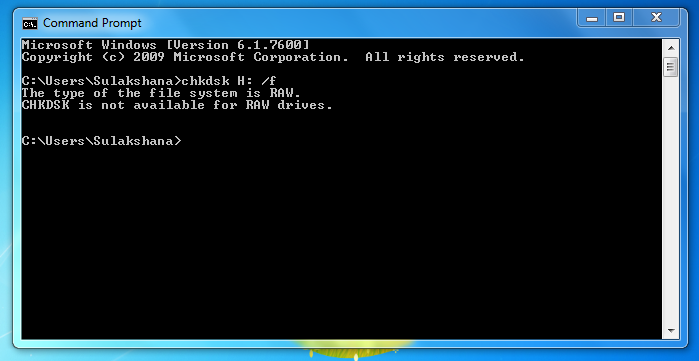
I have a 64 gb sd card.. also tried the chkdsk method but its telling me that its a RAW drive and it cannot be accesed, what does tha mean..? And what should i do ...?
Any advices would be greatly appreciated.
Thanks in advance! 🙂

- Answered
- Updated
I tried using Command Prompt to run Check Disc and it says cannot open device for direct access. I'm running Windows 7. The hard drive is running and not making any noise. I can access the external drive through the properties and it shows the amount of disc space that is used. It is a Segate 1tb external hard drive. Can someone tell me what to try. I have a lot of files on that drive I need to save.

- Answered
- Updated
Hi I would just like to no how u write in the chisel command is their spaces and do I write in no quotes thanks

- Answered
- Updated
Hi,
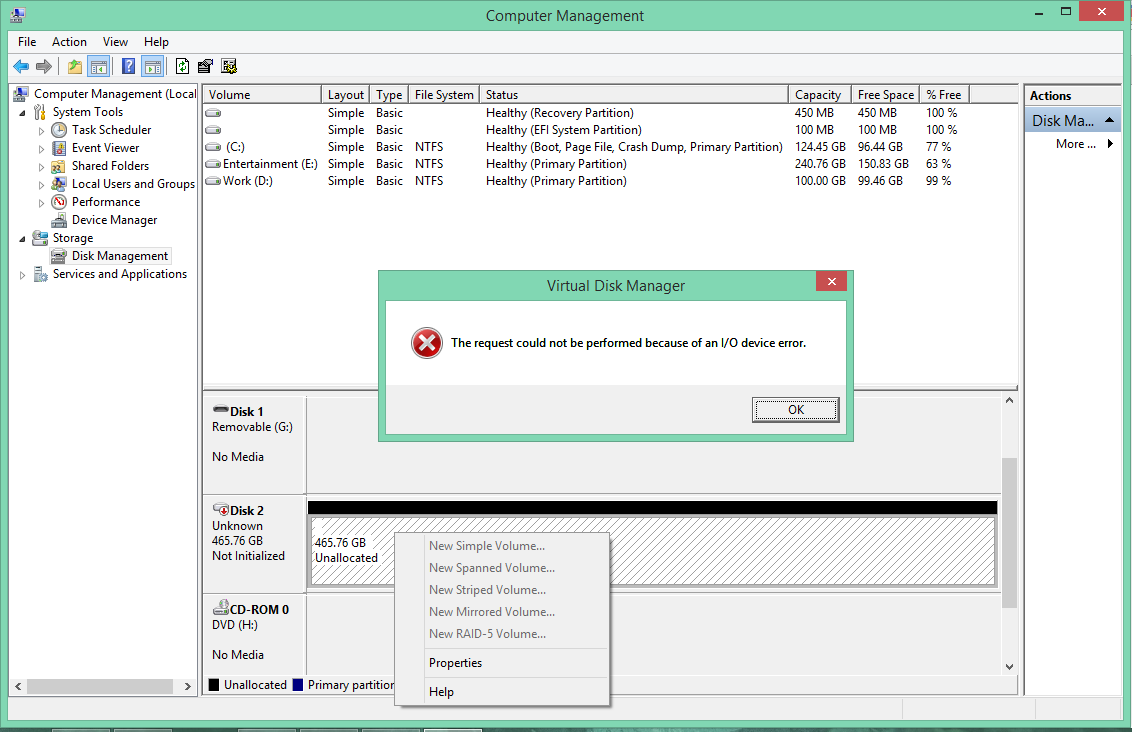
I have old SSD hard disk which is showing error "The request cannot be performed because of an I/O device error", all options are disabled. I want your help how to resolve it. It was working fine previously but all of sudden I got this error.
Thanks
- Answered
- Updated
@ kartik. I'm having the same issue and on my previous post I have not been able to get any one to help me and doing a Google search I can not find a way to fix the issue.
- Answered
- Updated
@jdw987, Please do respond if you get any solution. Thanks 🙂
- Answered
- Updated
@kartik. I will if I can find a way and if you should find a way first please respond back I have a lot of files on that hard drive that I can't replace.

- Answered
- Updated
I would of never guessed that this would work. A member here named Rumproast, suggested shaking my hard drive and turn it upside down and low and behold it worked. I just need the info off of it then I can work on the problem of the I/O error. When it showed up working all I could do is laugh. Thanks.