Ibm Thinkpad T23 Boot Problem

  • vnl
  • Born
  • Born
  • No Avatar
  • Joined: Feb 08, 2007
  • Posts: 1
  • Status: Offline

Post February 8th, 2007, 6:37 am

Hi guys,

My T40 got the same problem, I'm wondering if anyone of you had your T40 fixed, please help me, thanks a lot
  • Anonymous
  • Bot
  • No Avatar
  • Joined: 25 Feb 2008
  • Posts: ?
  • Loc: Ozzuland
  • Status: Online

Post February 8th, 2007, 6:37 am

  • neber
  • Born
  • Born
  • No Avatar
  • Joined: Jan 31, 2007
  • Posts: 1
  • Status: Offline

Post February 9th, 2007, 2:25 pm

Thank you for a cool discussion group, just what I was looking for. There are some good hints about how to fix old T23 IBM's. I have a challenge for you guys, I too have a T23 with 866 Mhz. processor, 13 inch, pc133 so dimm 256 MB 144-pins, 40 GB HD 5400 rpm.
Guys I really hope you can help me with this, it is a very nice laptop, as many other owners already are saying and I’m no different. I have new ram and hard disk in it and I don’t think it is a fan or a magnet problem. I’m hoping it’s a soldering matter. Thinking of taking it to a TV-radio repair shop, but I don’t know where it should be re-soldered.

Problems and symptoms (history of events):
1) It began freezing after the hot summer we had, and also giving me a blue screen. I tried changing the ram, which stopped the blue screen, but still it froze. Back then I had given up on the laptop and returned the new ram.

2) But then I found this discussion group and I looked inside the laptop. I took off the heatsink and found that there was a little grease left. I reapplied some grease and it worked for a day….

3) Bought some ram again. But still it wouldn’t work properly. It then became a challenge for me and also I didn’t want to return the ram.

4) I changed the hard disk with a new one, because pcdoctor said it had an “excessive shock” on it and I thought it might be that… But no.

5) Found some additional sites, which could explain the problem… But no.
a) “IBM Laptop freezes when moved”: It seemed to freeze when I put my finger on the cover outside the ram slot. So soldering the ram slot could solve the problem. I haven’t done it, because after a while it didn’t seem to care where I put my fingers.
http://www-new.experts-exchange.com/Har ... d=21183949
b) “Why do I get a blue screen…” “physical memory dump”.
http://www.rockware.com/support/questio ... h_rvs.html
Didn’t seem to help

6) So after some months of frustration the problems are still:
a) A boot problem, it gives 4 beeps (have also heard 8 beeps). This indicates ram, ram slot or system board problem according the manual.
b) When it starts windows (sometimes), it would crash with a freeze or give a blue screen with a reboot (sometimes without). It say “physical memory dump” with different codes every time. And sometimes I’m able to work on it, for a couple of hours.

Neber
  • dsmitty308
  • Born
  • Born
  • No Avatar
  • Joined: Feb 10, 2007
  • Posts: 4
  • Loc: Arizona
  • Status: Offline

Post February 10th, 2007, 9:28 pm

twmspro wrote:
I'm glad I could help you. The T23's are nice little laptops. Very sturdy seems like to me. Glad I could help.


I had my T23 quit about 3 weeks ago. It happened a minute after inserting a PCMCIA NIC. I figured it was toast and bought what was supposed to be a parts T23 off Ebay. It turned out to be a working laptop :D :D :D :D :D so I still wanted to get mine working.

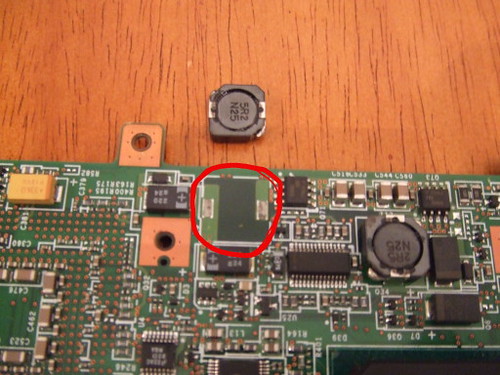
I found this thread and have been studying it for the last few days. I had downloaded the FRU replacement manual from IBM. That helped a lot when I took the computer apart today. When I finally got the motherboard removed, the magnet looking coil was still it. I pried it lightly with a screwdriver and it popped off.

I then decided to dig out my 35 year old soldering iron and was able to solder the two connections back together.

I then reassembled the laptop and it works fine! But I did have some leftover screws.

Had I not found this thread, I probably would have parted out my T23!

Thanks for all the great help!

Smitty
  • jhaanti
  • Newbie
  • Newbie
  • No Avatar
  • Joined: Feb 11, 2007
  • Posts: 6
  • Loc: San Jose, CA, USA
  • Status: Offline

Post February 11th, 2007, 7:15 pm

Hello All,

A google search with intermittent fan behaviour on my 4+ years old T23 pointed me to this wonderful discussion. I was wondering if any body still had the picture of that "magnet looking part" that twmspro posted. It would be very helpful in me not screwing things up. I have taken apart keyboard and stuff, but main board is still there. Do I need to take the main board out, and look at the bottom of it?

Thanks in advance,

Jhaanti
  • jhaanti
  • Newbie
  • Newbie
  • No Avatar
  • Joined: Feb 11, 2007
  • Posts: 6
  • Loc: San Jose, CA, USA
  • Status: Offline

Post February 11th, 2007, 7:18 pm

OK, never mind with the pictures. Firefox somehow didn't show me the picture the first couple of times I loaded the first page of this thread. However, on the 4th load, the pictures are there, and now I have a better idea as to what to look for.

Now I'll try to solder it, and see if that solves the problem.

Thanks twmspro again,

Jhaanti
  • dsmitty308
  • Born
  • Born
  • No Avatar
  • Joined: Feb 10, 2007
  • Posts: 4
  • Loc: Arizona
  • Status: Offline

Post February 11th, 2007, 8:05 pm

Yes, that part is on the bottom of the motherboard and the motherboard has to be removed.
If you have my luck, you will have some screws left over when you are done!

Smitty
  • jhaanti
  • Newbie
  • Newbie
  • No Avatar
  • Joined: Feb 11, 2007
  • Posts: 6
  • Loc: San Jose, CA, USA
  • Status: Offline

Post February 11th, 2007, 8:16 pm

Thanks Smitty,

Those parts don't appear to be lose at all. Some earlier comments indicated that even if they appear to be cemented tight, it helps to remove them anyway, and re-solder them. Will give that a shot, should take a deep breath or two before I try this kind of micro surgery.

Jhaanti
  • jhaanti
  • Newbie
  • Newbie
  • No Avatar
  • Joined: Feb 11, 2007
  • Posts: 6
  • Loc: San Jose, CA, USA
  • Status: Offline

Post February 11th, 2007, 8:51 pm

Hmm, 2R5 N18 came right off after a little bit of pressure from a screw-driver. However, the soldering part appears to be beyond my skills, as the head of the soldering iron I have it too thick. I'll try to find a local TV shop who would solder this for me.

Will let you know the results.

Jhaanti
  • dsmitty308
  • Born
  • Born
  • No Avatar
  • Joined: Feb 10, 2007
  • Posts: 4
  • Loc: Arizona
  • Status: Offline

Post February 14th, 2007, 9:11 pm

Good Luck!

Smitty
  • jhaanti
  • Newbie
  • Newbie
  • No Avatar
  • Joined: Feb 11, 2007
  • Posts: 6
  • Loc: San Jose, CA, USA
  • Status: Offline

Post February 14th, 2007, 10:44 pm

No such luck. After soldering and resoldering that inductor, the behaviour of the fan is still the same. Fan starts up for a little bit while booting, and then goes dead. Is there any way to have the fan just always running, rather than having it run on demand? Perhaps I can wire it up that way? What are the three wires going into the fan?

Jhaanti
  • jhaanti
  • Newbie
  • Newbie
  • No Avatar
  • Joined: Feb 11, 2007
  • Posts: 6
  • Loc: San Jose, CA, USA
  • Status: Offline

Post February 14th, 2007, 11:16 pm

Is there some re-calibration of thermal sensors required? What tool do I use to do that?
  • dsmitty308
  • Born
  • Born
  • No Avatar
  • Joined: Feb 10, 2007
  • Posts: 4
  • Loc: Arizona
  • Status: Offline

Post February 15th, 2007, 10:06 pm

I don't think that having the fan run all the time would correct the booting problem.

When my laptop was not working, the fan would go fast and slow. Now that it is running, the fan will run for awhile upon booting and then stop when the CPU cools down. When it heats up, the fan will come back on until it cools again.

Good Luck
Smitty
  • trist4n
  • Born
  • Born
  • No Avatar
  • Joined: Mar 16, 2007
  • Posts: 1
  • Status: Offline

Post March 16th, 2007, 9:21 am

H U G E T H A N K S !

I'm back from 2 hours of hardware surgery,
Soldering the magnet-like piece solved the problem here !

Thanks again ! I registered just to say that :D
  • elado
  • Born
  • Born
  • No Avatar
  • Joined: Mar 18, 2007
  • Posts: 1
  • Status: Offline

Post March 18th, 2007, 3:51 pm

Thanks twmspro
writing this message from my trusty t23 resurrected and operational once again, took me about two hours of disassembly but i finally found the little bugger , no great soldering skills so i just used some super glue under the magnet let it dry and put it all together now just have to find the missing screws left on the table also some screw holders were severed too so i glued them back together at the same time , wish i had some epoxy to make it even more snug, hope i wont have to do it again quite nerve wercking.
its kinda funny like the guys at ibm thought "well 5 years are more then enough for laptop lets design it so it disconnects in 5-6 years.
just kiddin thou this is my only pc for a year and it has seen some serious milage i'm surprised it lasted this long
thanks again twmspro registered to say thank you

greets from israel
  • grumpy
  • Born
  • Born
  • No Avatar
  • Joined: Mar 29, 2007
  • Posts: 1
  • Loc: CLEVELAND,OH
  • Status: Offline

Post March 29th, 2007, 10:22 am

I TOO HAVE THIS PROBLEM, I BOUGHT A T23 WITH A 20 GIG HD WIPEDE CLEAN, NO AC ADAPTOR, NO RAM( THOUGHT IT DID) I PLUGGED IN MY DAUGHTERS AC FROM A T20 AND NO LUCK NOTHING HAPPENED. SWAPED OUT BATTERIES, STILL NO LUCK, ADED RAM, SAME PROBLEM. I'M GOING TO TRY TEARING IT APART AND SEE IF THE ROUND MAGNET DISK IS LOOSE.
I'LL LET YOU KNOW
THANKS
  • Anonymous
  • Bot
  • No Avatar
  • Joined: 25 Feb 2008
  • Posts: ?
  • Loc: Ozzuland
  • Status: Online

Post March 29th, 2007, 10:22 am

Post Information

  • Total Posts in this topic: 112 posts
  • Users browsing this forum: No registered users and 56 guests
  • You cannot post new topics in this forum
  • You cannot reply to topics in this forum
  • You cannot edit your posts in this forum
  • You cannot delete your posts in this forum
  • You cannot post attachments in this forum


© 2011 Unmelted, LLC. Ozzu® is a registered trademark of Unmelted, LLC.