Ibm Thinkpad T23 Boot Problem

  • GT500Shlby
  • Guru
  • Guru
  • User avatar
  • Joined: Jul 28, 2004
  • Posts: 1205
  • Loc: Philadelphia, PA
  • Status: Offline

Post August 21st, 2007, 2:21 pm

IBM could care less about depreciated end-of-life legacy laptops. They will tell you that the warranty is expired and you are better off buying a new one.
"Now, I don't want to get off on a rant here, but..." - Dennis Miller
Image
  • Anonymous
  • Bot
  • No Avatar
  • Joined: 25 Feb 2008
  • Posts: ?
  • Loc: Ozzuland
  • Status: Online

Post August 21st, 2007, 2:21 pm

  • renfrowk
  • Born
  • Born
  • No Avatar
  • Joined: Aug 20, 2007
  • Posts: 3
  • Status: Offline

Post August 21st, 2007, 6:31 pm

GT500Shlby wrote:
IBM could care less about depreciated end-of-life legacy laptops. They will tell you that the warranty is expired and you are better off buying a new one.


So true.

Good news. I was troubleshooting my problem (the symptoms were identical to the original problem described in this forum) and I was able to get the laptop working fine once I unplugged my modem chip. Maybe this will be useful for someone else on this forum. Worth trying before you dig down to the motherboard.

-Kevin
  • TCarter
  • Born
  • Born
  • No Avatar
  • Joined: Sep 03, 2007
  • Posts: 1
  • Status: Offline

Post September 3rd, 2007, 11:59 am

Do you have to take out the motherboard to solder it and do all of the magnet things have 2R5-N23. Thanks
  • renfrowk
  • Born
  • Born
  • No Avatar
  • Joined: Aug 20, 2007
  • Posts: 3
  • Status: Offline

Post September 4th, 2007, 8:10 am

Yes. It's actually on the underside of the motherboard.
  • azoic
  • Born
  • Born
  • No Avatar
  • Joined: Sep 17, 2007
  • Posts: 1
  • Loc: Ottawa
  • Status: Offline

Post September 17th, 2007, 6:31 am

A most excellent thread. I took the plunge and disassembled the T23, and the magnet in question is rock solid. I tried all the suggestions in this thread to no avail, and still I am unable to resolve this issue. I must say as a 50 year old guy, though I am undaunted by the entire process, I simply do not have the steady hand that the younger folks have, and so soldering is something of the past for me. This is only the second time I disassembled a laptop, but I am looking forward to more exploration in this area. I just wish I could find the real problem with this laptop, it is about 2 years since bought it, and has been nothing but a $500 brick since 3 months after I purchased it. I already tested the RAM and replaced the hard drive when if failed.

I certainly welcome any further suggesting in the event I have left some stone unturned.

Thanks to all and kudos the adventurous young folks who braved forward in resolving their issues
  • wolf359
  • Born
  • Born
  • No Avatar
  • Joined: Sep 22, 2007
  • Posts: 1
  • Loc: NM
  • Status: Offline

Post September 22nd, 2007, 3:58 pm

Thanks twmspro!

Upon finding and reading this thread this morning, I immediately tore my T23 down and got the mainboard out. With just a little pressure the coil popped off. One side was completely loose already. It looked like there was a layer of grey corrosion or flux at each solder pad. I scraped them clean and resoldered the coil down. It was difficult to fit my iron's tip behind one of the surface mount components on the edge of the board, but I got it. I put it back together with only one screw and a bit of metal left over.

It powers up and I'm using it right now.

Thanks again. I definitely couldn't afford a new laptop.
  • DINZERILLO
  • Born
  • Born
  • No Avatar
  • Joined: Sep 24, 2007
  • Posts: 1
  • Status: Offline

Post September 24th, 2007, 3:47 pm

pictures from twmspro no longer load! please re-post someone! thanks!
  • Extrememr2
  • Born
  • Born
  • No Avatar
  • Joined: Nov 06, 2007
  • Posts: 1
  • Status: Offline

Post November 6th, 2007, 8:25 pm

I would like to post something I learned.
I found this thread searching for my problem.
The freezing and blue screen part sounded like the same issue, except I was not having any issues with fans or fan speeds.

I read another post about someone who also was having an issue with their T23, when the lower section of the computer (The door you can open to access the ram) was depressed the computer froze.

I tested this and sure enough my computer was freezing whenever I moved the computer and or applied pressure to this RAM access door.

Opening the door nothing looked out of the oridanary, although I am not an expert.

I have 1 RAM chip 256mb which was located in the front slot.
I moved the RAM chip to the back empty slot and WA LA fixed.
After this I looked close at everything..
- The door that goed over the RAM is ver flexible and was able the move the RAM stick in the front slot, but was not able to move the RAM stick once placed in the rear close because the RAM access door is supported better back there.

Hope this helps anyone who had this nightmare of an issue.

( I bought this computer as my first laptop, its use was for tuning my car. It was very frustrating having the laptop freeze while trying to correct my cars idle etc.).
  • lmkitties
  • Born
  • Born
  • No Avatar
  • Joined: Nov 14, 2007
  • Posts: 1
  • Status: Offline

Post November 14th, 2007, 11:25 am

Ohmigosh, thank you TMSWPRO. Your solution worked. The magnet thingy was in the bottom of the case, rattling around, just like you said it would be. I took it and the board to a computer shop and had the piece soldered back on. It was some task taking this computer apart. I'm no computer wiz. In fact, I'm an accountant who has never done anything like this. The instructions on the Lenovo site for taking apart the computer are fantastic. If I can do it, anybody can. Here's a refresh to the link for the publication that shows you how to take apart the T20, T21, T22 and T23.

ftp://ftp.software.ibm.com/pc/pccbbs/mo ... 2p9631.pdf

If this link fails to work, just go to the Lenovo site and type in the name of the file in the Search box: 62p9631.pdf.

Thanks to everyone who posted on this thread. It has saved me.
  • cenheart
  • Born
  • Born
  • No Avatar
  • Joined: Nov 20, 2007
  • Posts: 1
  • Status: Offline

Post November 20th, 2007, 2:13 am

THx this board and this thread i've found also that *peach* problem on my T23!
hope i can do the soldering!
  • alanmcl
  • Born
  • Born
  • No Avatar
  • Joined: Nov 17, 2007
  • Posts: 1
  • Status: Offline

Post November 27th, 2007, 11:25 pm

Thanks twmspro this problem occured on my t23 laptop about 3 week ago took it to the local computer shop paid £28 pounds to be told it could not be fixed found your forum took it apart using the hardware manual which is here http://www-307.ibm.com/pc/support/site. ... IGR-4UYM3F
and is the PDF 62p9631.pdf called the Hardware Maintenance Manual
soldered the piece back in place put it back together and it works fine again.

Thanks again without this forum I would be buying another laptop this Christmas.
  • tchaiket
  • Born
  • Born
  • No Avatar
  • Joined: Nov 30, 2007
  • Posts: 1
  • Status: Offline

Post November 30th, 2007, 7:37 pm

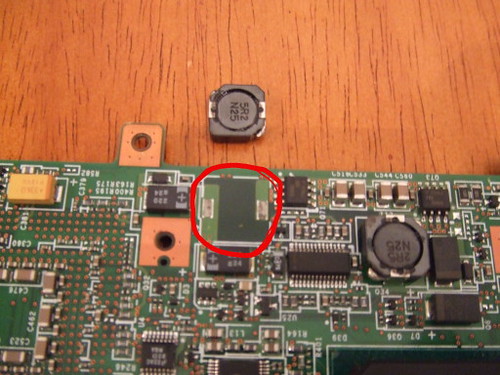
I read the thread and decided to open up my T23. I found the magnet looking piece lying on the bottom of the case. Wow! Exact same problem. However, it looks like my problem is with a different chip(or whatever this is). Here is a picture.

Image

I'm not familiar with soldering. My question is how do I know how this chip should be placed. When I flip over this chip I see the 2 connections. But how do I know which connection goes with which on the board.
Thanks!
  • Abkanis_Liver
  • Born
  • Born
  • No Avatar
  • Joined: Dec 04, 2007
  • Posts: 3
  • Status: Offline

Post December 4th, 2007, 12:15 pm

I have a IBM t21 laptop that is experiencing almost an Identical Problem,
it doesn't boot, the fans run, and a few of the LED's run but nothing more.

Interestingly, It will sometimes boot if I apply pressure to random areas of the underside, and work normally except that it doesn't "restart" but just hangs at the "Windows is shutting down screen" indefinitely.

I would very much Like to get this thing fixed, since its technically not mine, and has served me oh so well in the 2 weeks it was in my possession before this started. (I am inline to inherit it).

Any Help would be greatly appreciated.

Specs: 800mhz processor, one chip of 128ram, win98se, 20gb hdd
  • Nightshift_HD
  • Born
  • Born
  • No Avatar
  • Joined: Mar 05, 2008
  • Posts: 3
  • Status: Offline

Post March 5th, 2008, 7:14 pm

tchaiket wrote:
I read the thread and decided to open up my T23. I found the magnet looking piece lying on the bottom of the case. Wow! Exact same problem. However, it looks like my problem is with a different chip(or whatever this is). Here is a picture.

Image

I'm not familiar with soldering. My question is how do I know how this chip should be placed. When I flip over this chip I see the 2 connections. But how do I know which connection goes with which on the board.
Thanks!

tchaiket, I'm not sure if you ever got an answer, but I have two T23s with the "fan error" problem on bootup, and have just read this thread and decided to tear them apart. I'm holding the MOBO of one unit, and looking at the pair of magnet thingys on the bottom side. I don't think it matters which way you solder it back on, but mine is on tight, and the "5R2 N24" on it is facing the left side of your picture (ie: just the way you have it oriented in your picture).
  • Nightshift_HD
  • Born
  • Born
  • No Avatar
  • Joined: Mar 05, 2008
  • Posts: 3
  • Status: Offline

Post March 5th, 2008, 7:22 pm

I hope people are still reading this thread, as my T23s do not have any loose magnet thingys. There are 3 of them on the MOBO, 2 on the bottom side and 1 on top side, and all are securely soldered on.

Yet my units won't boot anymore ... all I get is 2 beeps and then "Fan Error". So if it's not the magnet thingys causing this problem on mine, and ideas what to look for next?
  • Anonymous
  • Bot
  • No Avatar
  • Joined: 25 Feb 2008
  • Posts: ?
  • Loc: Ozzuland
  • Status: Online

Post March 5th, 2008, 7:22 pm

Post Information

  • Total Posts in this topic: 112 posts
  • Users browsing this forum: No registered users and 68 guests
  • You cannot post new topics in this forum
  • You cannot reply to topics in this forum
  • You cannot edit your posts in this forum
  • You cannot delete your posts in this forum
  • You cannot post attachments in this forum


© 2011 Unmelted, LLC. Ozzu® is a registered trademark of Unmelted, LLC.