Ibm Thinkpad T23 Boot Problem

  • Nightshift_HD
  • Born
  • Born
  • No Avatar
  • Joined: Mar 05, 2008
  • Posts: 3
  • Status: Offline

Post March 5th, 2008, 9:04 pm

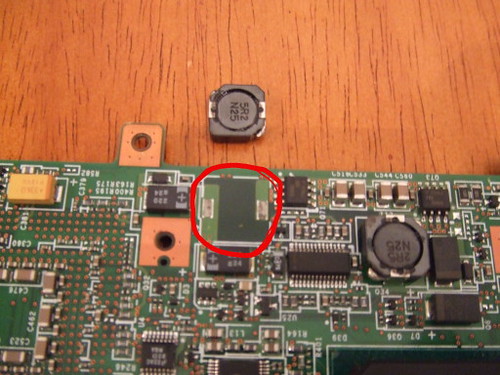
Ok, I looked at the MOBO closely, and in particular those 3 magnet thingys. With a little exacto knife, I gently pryed on each of them, and what'd'ya'know ... they all popped off. Very easily I might add. 90 minutes later, I have cleaned the contacts on them, re-soldered them back on, and then put the whole thing back together.

Crossed my finger and hit the power button. Reset the date and time in the BIOS and voila ... #1 T23 seems to be purrin' like a kitten again. Sweet. Now to let it run overnight and see how it's doing in the morning. If still fine, I'll do the same to #2 T23 tomorrow.

Thanks for this useful thread. And in particular TWMSPRO for getting us started on the right path with the magnet thingys!
  • Anonymous
  • Bot
  • No Avatar
  • Joined: 25 Feb 2008
  • Posts: ?
  • Loc: Ozzuland
  • Status: Online

Post March 5th, 2008, 9:04 pm

  • guard
  • Born
  • Born
  • No Avatar
  • Joined: Mar 14, 2008
  • Posts: 2
  • Status: Offline

Post March 14th, 2008, 10:42 am

I would like to thank you all for you help...it saved me from selling the t23 off as parts on ebay....the info was dead on and it was the MOBO!! Off to the computer shop for some soldering work!
  • guard
  • Born
  • Born
  • No Avatar
  • Joined: Mar 14, 2008
  • Posts: 2
  • Status: Offline

Post March 15th, 2008, 1:29 pm

well.....no one at the computer shops would touch it the mother board...they look horrified...or we don't do that or they wanted $$$ up front ....told them all to beat it....do it myself... see spending Over a $100..or more on a this t23 to fix it...I did it my self......carefully and it worked!! Man...it felt good!!!

Again, thanks you all for this post....I know it will help some one else down the road!

Peace!
  • twmspro
  • Expert
  • Expert
  • User avatar
  • Joined: Nov 03, 2003
  • Posts: 591
  • Loc: Indiana
  • Status: Offline

Post March 17th, 2008, 6:10 pm

Hey folks. It's been a while. I've been having some recent t23 problems myself, again. Sometimes when I first pull the computer out of my bag to turn it on, it's had time to cool down, i get one beep, then continous series's of three beeps. I then shake the computer around for a little, cycling through plugging it in taking my wifi card out and the like. After a few minutes it turns on, but sits at post with the screen off. After a few more tries it finally comes on and boots.

I have also been getting random bsod's and freeze's. Everything I've looked at suggests that it would be bad ram. The thing is there's always been one slot that goes dead whenever it likes. I have 2 DIMM's of 128mb. The computer is currently taken apart and I see no appearant problems with anything other than dirty contacts and broken plastic and metal. Thank god the for metal cage.

As for the photos that I put up forever and half ago, I currently don't have a computer capable of accesing my SATA drives. I've been desktop less for about 6-7 months and it's a pain in the ass. If I can find them again, I'll put them back up somewhere.

As long as ozzu emails me about these thread updates, I should be able to contribute to these issues.
  • Critical Air
  • Born
  • Born
  • No Avatar
  • Joined: Mar 29, 2008
  • Posts: 1
  • Status: Offline

Post March 29th, 2008, 3:30 pm

Okay, I came across this site due to a freezing issue, and I originally tried to update the BIOS due to some advice. Unfortunatly, the computer froze during the BIOS update, and now nothing appears. I'm not sure if that's a BIOS problem, or a problem with the 'magnets'. Does anyone know how to restore the BIOS, as I'm pretty sure it was toasted when it froze during the update. Thanks!!!
  • thinkpadt40
  • Born
  • Born
  • No Avatar
  • Joined: Apr 22, 2008
  • Posts: 4
  • Status: Offline

Post April 22nd, 2008, 4:46 pm

Hello Everybody,

My T40 Laptop is having the same startup problem and I am considering giving this solution a try. Can anyone post the pics of the "magnet" like things so I have an idea of what they look like. Thanks very much in advance.
  • twmspro
  • Expert
  • Expert
  • User avatar
  • Joined: Nov 03, 2003
  • Posts: 591
  • Loc: Indiana
  • Status: Offline

Post April 22nd, 2008, 4:58 pm

Sup folks. Excuse me for being gone a while since my last post. School and switching to OSX86 have been taking a lot of my time tweaking and such. My hard drive intended for my backup oddly lost all my files. out of about 98 gigs of stuff on there i only got back about 7 gigs. i'll look for the pictures. I doubt i have them anywhere.
  • thinkpadt40
  • Born
  • Born
  • No Avatar
  • Joined: Apr 22, 2008
  • Posts: 4
  • Status: Offline

Post April 22nd, 2008, 6:11 pm

Hi twmspro
Can you post the pics of the "magnet" like things so I have an idea of what they look like? Thanks very much in advance.
  • twmspro
  • Expert
  • Expert
  • User avatar
  • Joined: Nov 03, 2003
  • Posts: 591
  • Loc: Indiana
  • Status: Offline

Post April 22nd, 2008, 6:55 pm

If I can find the photos yes. I most likely wont be able too. They should be floating out on the internet somewhere.
  • twmspro
  • Expert
  • Expert
  • User avatar
  • Joined: Nov 03, 2003
  • Posts: 591
  • Loc: Indiana
  • Status: Offline

Post April 22nd, 2008, 7:03 pm

Got em. You my friend are in some major luck. I just so happen to have them in my web folder of my web server. The domain's not active, so that's why the links dont work.


http://www.flickr.com/photos/twmsdude/s ... 682294460/

enjoy
  • thinkpadt40
  • Born
  • Born
  • No Avatar
  • Joined: Apr 22, 2008
  • Posts: 4
  • Status: Offline

Post April 22nd, 2008, 8:31 pm

Thanks a ton!! twmspro
My T40 is now all dissected and in front of me. The mobo here is quite different from the T23. I can see only 1 magnet like piece (150 N41) here. It seems though that this part is pretty firmly attached. I tried pushing it around with some gentle force to see if it would pop out but it stays pretty firm. One thing though. I tried pressing down the thing firmly and I think that I heard a click sound. If this was because of a loose contact, I hope this fixes the machine. I am keeping my fingers crossed. Will report back in a couple of hours on success/failure.
  • thinkpadt40
  • Born
  • Born
  • No Avatar
  • Joined: Apr 22, 2008
  • Posts: 4
  • Status: Offline

Post April 23rd, 2008, 2:44 pm

OK, This is going to be a long post but I guess its better to give all possible details. First5 though, I would like to thank all the people who have posted here. Until I found this thread, I had almost given up hopes of reviving my laptop but now it at least seems possible. Now to the actual stuff. My problem with my t40 (1.5 Ghz Pentium M, 1 Gig RAM, 60 Gig HD 5400 rpm, Windows XP SP2) is 2 pronged - 1st my computer just freezes and hangs and when I shut it down forcefully and try to restart it, it won't boot and the fan problem starts. At first I thought that both the problems were related, so I formatted my HD and reinstalled Windows. Unfortunately, the problem became worse and my laptop started freezing after abt 30 mins of operation and then wouldn't reboot.

So I decided to follow IBM's troubleshooting guide. This is what I did:
1. Ran PC-Doctor - Everything was fine.
2. Reseated hardware (DIMM, HDD, CD/DVD Drive, Mini PCI card) - Problem was still there.
3. Updated BIOS - NO Help.

Then I found this thread and this is what I did:
4. Took everything apart to check for the magnet thingy. Here I found that the T40 mobo is diff. Found only on the underside and it was firm. There were a few on the top side as well. Checked them too. Everything seems fine. Put everything back together and rebooted. The boot problem seems to have eased up. M/c boots up 1 in every 2-3 attempts but still freezes after 30 mins.
5. Removed the Mini PCI card and the daughter communications card. Now my system is running much better. Freeze frequency has dropped but the problem is still there.

So now, I really don't know what to do. Will try to update my drivers but I don't know how far that will get me. Can anybody suggest what might be the problem or how to fix the freeze/reboot issue. Any help will be appreciated. I need my PC for work and I can't afford a new one now. Thanks a lot!!
  • Bogey
  • Bogey
  • Genius
  • User avatar
  • Joined: Jul 14, 2005
  • Posts: 8211
  • Loc: USA
  • Status: Offline

Post April 23rd, 2008, 3:12 pm

Go to the first post of this thread (made by twmspro) and read the list of things that are not the problem. Even though they are suggested as not being the problem, test those things out as the problem doesn't reside in a loose connection.
"Bring forth therefore fruits meet for repentance:" Matthew 3:8
  • mwalimu
  • Born
  • Born
  • No Avatar
  • Joined: Aug 16, 2008
  • Posts: 2
  • Status: Offline

Post August 16th, 2008, 3:58 am

hi
i'm a germa volunteer in tazania and my t23 has the same boot prolemes as some of you have descried here before: screen stays dark and a 1-3-3-1 bios beep is heard.
after shaking laptop slightly it starts after 1 up to 15 trys. when booted it works perfectly, no freezes or beeps.
i dont know much about laptops but since i'm in tanzania noone can help me here.
any ideas would be appreaciated.
could it also be the magnet like piece at the motheroard or the DIMM.
how could i fix it... do i need a ironyig thing (piston...i dont know the i dont know the english term) . so far i only have a screwdriver ;-)
thx in advance,
mwalimu
  • articularPig
  • Born
  • Born
  • No Avatar
  • Joined: Aug 17, 2008
  • Posts: 1
  • Status: Offline

Post August 17th, 2008, 6:17 pm

I had the same errors and looked to see if the magnets were dislodged. This was not the problem as they were both firmly in place. I noticed that the thermal compound between the processor and the fan was dry and brittle and suspected that heat dissipation was the issue. I purchased some thermal compound at radio shack, cleaned the heat sink and the processor with rubbing alcohol, and applied a thin new coat. It's been more than 24 hours and the laptop had not had one issue since!! All you need to do is remove the keyboard and the top plastic frame to remove the fan. Good luck.
  • Anonymous
  • Bot
  • No Avatar
  • Joined: 25 Feb 2008
  • Posts: ?
  • Loc: Ozzuland
  • Status: Online

Post August 17th, 2008, 6:17 pm

Post Information

  • Total Posts in this topic: 112 posts
  • Users browsing this forum: No registered users and 55 guests
  • You cannot post new topics in this forum
  • You cannot reply to topics in this forum
  • You cannot edit your posts in this forum
  • You cannot delete your posts in this forum
  • You cannot post attachments in this forum


© 2011 Unmelted, LLC. Ozzu® is a registered trademark of Unmelted, LLC.