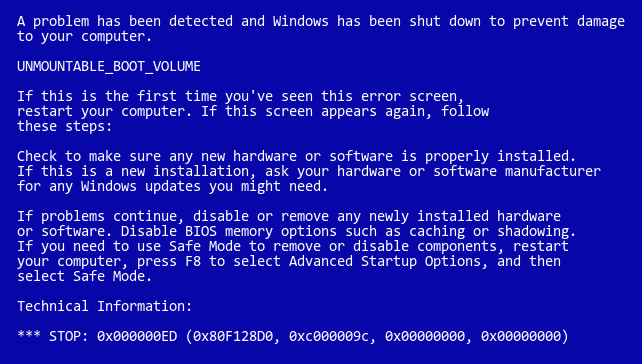
Windows Xp Problem: Unmountable Boot Volume

  • renmar
  • Born
  • Born
  • No Avatar
  • Joined: Sep 23, 2009
  • Posts: 1
  • Status: Offline

Post September 23rd, 2009, 9:12 pm

ATNO/TW wrote:
Don't press either.
Follow the six steps in these instructions. The pictures show you exactly what you should see.

When you get to step six and are at the command prompt type fixmbr
You'll get a warning. Just accept it and reboot normally.


I think what he is talking about above is that he is not getting the option for the repair console.

He's not getting the options listed to him like what is posted above.

It's totally bypassing this particular option. It's doing the same thing for me, and I can't quite figure it out.
  • Anonymous
  • Bot
  • No Avatar
  • Joined: 25 Feb 2008
  • Posts: ?
  • Loc: Ozzuland
  • Status: Online

Post September 23rd, 2009, 9:12 pm

  • c3callaghan3
  • Born
  • Born
  • No Avatar
  • Joined: Sep 22, 2009
  • Posts: 2
  • Status: Offline

Post September 24th, 2009, 12:19 am

Yes, sounds like we have the same problem renmar!
  • cslmc
  • Born
  • Born
  • No Avatar
  • Joined: Oct 22, 2009
  • Posts: 1
  • Status: Offline

Post October 22nd, 2009, 9:00 am

On this same topic. I have tried CHKDSK but keep getting redirected to SCANDISK, which I ran and no errors were found. However, at the DOS prompt, when I issue the C: DIR command, no directories are showing and only a few files are displaying, one of them being SCANDISK. How come I can't get to my WINDOWS directory. Is it toasted? This is a bit scary. Any suggestions are appreciated.
  • pccare_himanshu
  • Beginner
  • Beginner
  • No Avatar
  • Joined: Nov 12, 2009
  • Posts: 37
  • Status: Offline

Post November 18th, 2009, 12:56 am

Hi nakano

Steps to troubleshoot this kind of problem

1. Boot from the cd
2. On the welcome to the set up Screen press "R"
3. It can show you some options to boot we have to enter that digit which has c:\windows in front of it

example:
1. c:\windows
2. d:\

In this kind of case we have press 1 and hit enter

4. It will prompt you for administrator's password
If you set a password please enter it and hit ENTER after it
OR, If you dont kbnow the password for administrator's account you can try to hit enter without any password (By default it is blank)

5.when you are on c:\windows prompt
type chkdsk /p
It checks the performance and errors on the hard drive
If there are errors after completing the scan it can show you
the volume has one or more errors
OR
the volume appears to have unrecoverable errors

6. If you get "the volume appears to have unrecoverable errors" ther are very less chances that you boot into same operating system back but if you get " the volume has one or more errors" you can try to fix the error

7. To fix the errors type

chkdsk /r

this command will try to fix the errors and when this command completes type

chkdsk /p

again to check if the errors removed and after this type

EXIT

it will reboot your system and try to boot


BEST OF LUCK
  • Texannette
  • Born
  • Born
  • No Avatar
  • Joined: Jan 08, 2010
  • Posts: 1
  • Status: Offline

Post January 8th, 2010, 9:45 am

I'm having this same problem on my desktop. I have finally gotten to the blue screen where I enter R for repair--but for some reason it is saying that I don't have a hard disc drive~~I have the XP CD in the drive~~can you please tell me what I'm doing wrong????
  • BIgK in CA
  • Born
  • Born
  • No Avatar
  • Joined: Jan 08, 2010
  • Posts: 1
  • Status: Offline

Post January 8th, 2010, 3:50 pm

Texannette wrote:
I'm having this same problem on my desktop. I have finally gotten to the blue screen where I enter R for repair--but for some reason it is saying that I don't have a hard disc drive~~I have the XP CD in the drive~~can you please tell me what I'm doing wrong????


Me too! My screen shows my D drive as the only option to repair. Its like it cant find my c drive! Please help. :?
  • jimmy290784
  • Born
  • Born
  • No Avatar
  • Joined: Mar 02, 2010
  • Posts: 1
  • Status: Offline

Post March 2nd, 2010, 10:43 am

I've generally found that drives with this error have often failed. Try running a seatools for DOS from a boot disk
  • DonutUK
  • Born
  • Born
  • No Avatar
  • Joined: Apr 25, 2010
  • Posts: 1
  • Status: Offline

Post April 25th, 2010, 5:14 am

I only have an "Reinstallation Disk" from Dell.....

Will this do the same thing as the Windows Disk?
  • stefan0s++
  • Born
  • Born
  • No Avatar
  • Joined: Sep 08, 2010
  • Posts: 3
  • Status: Offline

Post September 8th, 2010, 10:05 am

I have the same problem but I don't have the CD recovery disc. Would formatting the hard drive be a solution?
Moderator Remark: Re-phrased question
  • ATNO/TW
  • Super Moderator
  • Super Moderator
  • User avatar
  • Joined: May 28, 2003
  • Posts: 23404
  • Loc: Woodbridge VA
  • Status: Offline

Post September 10th, 2010, 4:06 am

stefan0s++ wrote:
I have the same problem but I don't have the CD recovery disc. Would formatting the hard drive be a solution?


If you have no CD recovery disc, then reformatting would not be a solution. That would leave you with a blank hard drive that would be of no use except perhaps a slave drive for file storage.
"There's no place like 127.0.0.1 except for ::1."
Alexandria Networks. Leader in IT consulting for associations/non-profits, and small to medium sized businesses around the northern Virginia and Washington D.C. metro area.
  • stefan0s++
  • Born
  • Born
  • No Avatar
  • Joined: Sep 08, 2010
  • Posts: 3
  • Status: Offline

Post September 10th, 2010, 9:46 am

what do you suggest then?i dont care if i lose my files,because i use this pc only for getting online.the important files are on another pc.thanks for your time...
  • grinch2171
  • Moderator
  • Genius
  • User avatar
  • Joined: Feb 11, 2004
  • Posts: 6737
  • Loc: Martinsburg, WV
  • Status: Offline

Post September 10th, 2010, 11:19 am

You could format but as ATNO stated, you will need an install disk, which you would need to purchase.
‎"Be polite, be professional, but have a plan to kill everybody you meet." Maj. Gen. James Mattis
  • ATNO/TW
  • Super Moderator
  • Super Moderator
  • User avatar
  • Joined: May 28, 2003
  • Posts: 23404
  • Loc: Woodbridge VA
  • Status: Offline

Post September 14th, 2010, 6:01 am

Do you have a recovery partition? Most computers these days come with one when purchased through an OEM.
"There's no place like 127.0.0.1 except for ::1."
Alexandria Networks. Leader in IT consulting for associations/non-profits, and small to medium sized businesses around the northern Virginia and Washington D.C. metro area.
  • sweetcav
  • Born
  • Born
  • No Avatar
  • Joined: Jan 29, 2011
  • Posts: 1
  • Status: Offline

Post January 29th, 2011, 4:09 pm

sorry for resurrecting a dead thread but i am having this same problem and get all the way to my recovery cd blue screen and on the bottom in white it says "examining 238418 MB Disk 0 at ID 0 on bus 0 on iastor..." but it never goes anywhere i have left it run like this overnight thinking that maybe it takes time but I have had no progress. any thoughts Thanks in advance
  • a4asit
  • Kalkin
  • Graduate
  • User avatar
  • Joined: Jan 14, 2011
  • Posts: 114
  • Loc: India
  • Status: Offline

Post February 1st, 2011, 11:58 pm

hey i hope you already know about the repair console. if you do then use these two commands to repair your disk boot record:
Code: [ Select ]
fixmbr
fixboot
  1. fixmbr
  2. fixboot

both of them will ask for confirmation. when asked press "y" (without quotes, ofcourse).

after that do a chkdsk command with /f and i think it will do. even then if your disk shows errors then perhaps your NTFS is busted! sorry.

since you have boot problem i think this will do even without the chkdsk command.
enjoy

ciao!
  • Anonymous
  • Bot
  • No Avatar
  • Joined: 25 Feb 2008
  • Posts: ?
  • Loc: Ozzuland
  • Status: Online

Post February 1st, 2011, 11:58 pm

Post Information

  • Total Posts in this topic: 30 posts
  • Users browsing this forum: No registered users and 105 guests
  • You cannot post new topics in this forum
  • You cannot reply to topics in this forum
  • You cannot edit your posts in this forum
  • You cannot delete your posts in this forum
  • You cannot post attachments in this forum


© 2011 Unmelted, LLC. Ozzu® is a registered trademark of Unmelted, LLC.