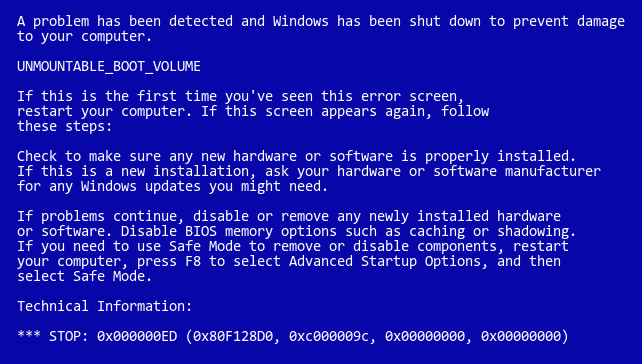
Windows Xp Problem: Unmountable Boot Volume

  • nakano
  • Born
  • Born
  • No Avatar
  • Joined: Jan 04, 2004
  • Posts: 2
  • Status: Offline

Post January 4th, 2004, 4:22 am

ok i was surfing the net one day when my com jammed. restarted it, and when windows xp was loading, a blue screen pops up saying 'unmountable boot volume' , and a few option appear... tried to run in safe mode but then again, same problem occurs... what on earth should i do next? all comments are appreciated i
  • Anonymous
  • Bot
  • No Avatar
  • Joined: 25 Feb 2008
  • Posts: ?
  • Loc: Ozzuland
  • Status: Online

Post January 4th, 2004, 4:22 am

  • ATNO/TW
  • Super Moderator
  • Super Moderator
  • User avatar
  • Joined: May 28, 2003
  • Posts: 23404
  • Loc: Woodbridge VA
  • Status: Offline

Post January 4th, 2004, 9:48 am

Your answer is here:

http://www.techtips4u.com/kb/sw/SW00014.htm
Google search = "unmountable boot volume" + XP
"There's no place like 127.0.0.1 except for ::1."
Alexandria Networks. Leader in IT consulting for associations/non-profits, and small to medium sized businesses around the northern Virginia and Washington D.C. metro area.
  • Borrow -A- Geek
  • Professor
  • Professor
  • User avatar
  • Joined: Dec 20, 2002
  • Posts: 775
  • Loc: Dallas/Ft Worth, Texas
  • Status: Offline

Post January 4th, 2004, 3:26 pm

yup had to fix a customers computer just last week with that exact same error message... and yup chkdsk fixed it..

aditionally if it does not, go back to the recovery console and run "fixboot" , i didnt see any mention of that in that link anywhere..

good luck..
  • jnbsball
  • Born
  • Born
  • No Avatar
  • Joined: Apr 05, 2007
  • Posts: 1
  • Status: Offline

Post April 5th, 2007, 2:49 pm

when exactly do you press r to get the dos prompt? Do you have to go through all the floppy disks first or do you just run the check when the blue windows setup screen comes up. Because I have followed the automatic setup that the windows setup is doing and it goes through all the floppy disks then once they are done that same blue screen comes up but this time the unmountable boot volume just isnt there. So What do I do?
  • grinch2171
  • Moderator
  • Genius
  • User avatar
  • Joined: Feb 11, 2004
  • Posts: 6737
  • Loc: Martinsburg, WV
  • Status: Offline

Post April 6th, 2007, 3:53 am

jnbsball wrote:
when exactly do you press r to get the dos prompt?


It is pretty much at the beginning of the install. You will have a screen that looks similar to this
Image

That is when you will press the 'R' key.
‎"Be polite, be professional, but have a plan to kill everybody you meet." Maj. Gen. James Mattis
  • WaeHaKe
  • Born
  • Born
  • No Avatar
  • Joined: Dec 29, 2007
  • Posts: 1
  • Status: Offline

Post December 29th, 2007, 8:24 pm

hello people im sorry but i am getting this error as well, well my cousin is having the same error, i was wondering if i would be able to use any type of windows xp cd to use chkdsk or does it have to be the exact windows xp version? i am wondering because my cousin does not have his windows xp cd and i only have the windows xp home edition sp2 cd laying around at my house. thank you in advance for your help, and please respond to my concern it will be greatly appreciated
  • stellaweaver42
  • Born
  • Born
  • No Avatar
  • Joined: Jun 30, 2009
  • Posts: 1
  • Status: Offline

Post June 30th, 2009, 12:34 pm

Before I do this to fix my computer, does it delete all of the files that I had on it before? It only acted like this after a program called "Personal Antivirus" installed itself onto my computer. It blocked everything and after two days I got this error message. I already had a virus scan program on it and it never detected anything. My brother's computer and my mom's has also been acting strangely and somewhat like mine did before it had this problem. What should I do and can somebody please tell me if it will delete everything on the computer? Oh, and when I put in the floppies, what will happen?
  • ATNO/TW
  • Super Moderator
  • Super Moderator
  • User avatar
  • Joined: May 28, 2003
  • Posts: 23404
  • Loc: Woodbridge VA
  • Status: Offline

Post June 30th, 2009, 1:24 pm

This fix will not delete your files. It scans your drive for errors and repairs system files. fixboot will correct a corrupted boot.ini file so Windows boots where it should normally. And you shouldn't need or use floppies. You need the XP installation CD to get to the recovery console.

If you are unfamiliar with doing this kind of thing, you should try to find a friend or a family member who is. Although this is a simple recovery method for experienced users, you do have the potential to screw up your computer if you really don't know what you are doing.
"There's no place like 127.0.0.1 except for ::1."
Alexandria Networks. Leader in IT consulting for associations/non-profits, and small to medium sized businesses around the northern Virginia and Washington D.C. metro area.
  • tpulas
  • Born
  • Born
  • No Avatar
  • Joined: Jul 03, 2009
  • Posts: 2
  • Status: Offline

Post July 3rd, 2009, 8:43 pm

The blue screen keeps coming up with unmountable boot volume. I put in my windows XP installation CD and tried to start the computer in safe mode. Unfortunately I can't get to the windows setup screen so i cannot enter R for repair. What happens is after trying to start windows the blue screen comes up again with the same unmountable boot volume message. Does anyone have any recommendations?

I am considering just scrapping this computer and buying another one as soon as possible so if anyone has any recommendations that would save me a lot of money!
  • mindfullsilence
  • Professor
  • Professor
  • User avatar
  • Joined: Aug 04, 2008
  • Posts: 846
  • Status: Offline

Post July 3rd, 2009, 9:14 pm

um...as others have said - use your windows xp cd.
Use your words like arrows to shoot toward your goal.
  • tpulas
  • Born
  • Born
  • No Avatar
  • Joined: Jul 03, 2009
  • Posts: 2
  • Status: Offline

Post July 3rd, 2009, 9:22 pm

Even when i put the windows xp cd in, it still just goes straight to the blue screen after i enter safe mode. I can't enter the windows setup screen and I don't have any opportunity to enter any commands.
  • mindfullsilence
  • Professor
  • Professor
  • User avatar
  • Joined: Aug 04, 2008
  • Posts: 846
  • Status: Offline

Post July 3rd, 2009, 9:43 pm

ok, that's a problem, lol.

Try using your windows xp cd. This time, when coming to the screen where you should press "r" - press "Enter" instead. This will bring you to a screen that shows a message stating: "previous installation of windows detected, would you like to repair this installation?" or something to that effect. On that prompt, repair the current installation. This won't delete your files or installations of your programs, but will restore windows back to it's original state. Afterwhich you'll need to install windows updates as well.
Use your words like arrows to shoot toward your goal.
  • blakhatt
  • Born
  • Born
  • No Avatar
  • Joined: Sep 17, 2009
  • Posts: 1
  • Status: Offline

Post September 17th, 2009, 10:28 am

Sorry to wake a dead thread, obviously tpulas needed to set his pc's bios to boot from the cd-rom drive instead of the harddrive; that is why it kept going to the bluescreen instead of setup.
  • c3callaghan3
  • Born
  • Born
  • No Avatar
  • Joined: Sep 22, 2009
  • Posts: 2
  • Status: Offline

Post September 22nd, 2009, 1:02 pm

Hello,

I would really appreciate some help with the same 'unmountable boot volume' error. I have changed the boot order so that I boot to the Windows XP CD, when the CD loads I get a blue screen with the heading 'Windows Setup' with a grey bar along the bottom first saying 'press F6 to install SSIC drivers...' then 'press F2 to run automated system recovery' neither of these options when pressed seem to do anything. After a few seconds the setup starts to load numerous different files until I am 'greeted' with another blue screen asking me select which partition I want to set-up windows XP on and then how I want to format the partition. I really do not want to lose all the files on my PC and therefore would like to know if and how I can proceed to perform the chkdsk of fixboot commands. Thanks
  • ATNO/TW
  • Super Moderator
  • Super Moderator
  • User avatar
  • Joined: May 28, 2003
  • Posts: 23404
  • Loc: Woodbridge VA
  • Status: Offline

Post September 22nd, 2009, 2:40 pm

Don't press either.
Follow the six steps in these instructions. The pictures show you exactly what you should see.
http://pcsupport.about.com/od/fixthepro ... onsole.htm

When you get to step six and are at the command prompt type fixmbr
You'll get a warning. Just accept it and reboot normally.
"There's no place like 127.0.0.1 except for ::1."
Alexandria Networks. Leader in IT consulting for associations/non-profits, and small to medium sized businesses around the northern Virginia and Washington D.C. metro area.
  • Anonymous
  • Bot
  • No Avatar
  • Joined: 25 Feb 2008
  • Posts: ?
  • Loc: Ozzuland
  • Status: Online

Post September 22nd, 2009, 2:40 pm

Post Information

  • Total Posts in this topic: 30 posts
  • Users browsing this forum: No registered users and 97 guests
  • You cannot post new topics in this forum
  • You cannot reply to topics in this forum
  • You cannot edit your posts in this forum
  • You cannot delete your posts in this forum
  • You cannot post attachments in this forum
 
cron
 

© 2011 Unmelted, LLC. Ozzu® is a registered trademark of Unmelted, LLC.