Can't seem to change colors in photoshop??

  • reaper
  • Proficient
  • Proficient
  • User avatar
  • Joined: Apr 05, 2005
  • Posts: 435
  • Loc: europe
  • Status: Offline

Post September 27th, 2005, 8:13 am

There is something really annoying and strange going one when i try to give something a certain color. I have the color grey on top of the toolbar and it just doesn't want to change...when i adjust the color in let's say the blending options it gives me the color that i want in the window but the color on top doesn't change, also the colors that i want to apply don't come to my objects.

It's like it's stuck in memory or something and it wants to stay that way.
What is going on and how can i make everything works as before?
  • Anonymous
  • Bot
  • No Avatar
  • Joined: 25 Feb 2008
  • Posts: ?
  • Loc: Ozzuland
  • Status: Online

Post September 27th, 2005, 8:13 am

  • eJPM5000
  • Novice
  • Novice
  • No Avatar
  • Joined: Jun 24, 2005
  • Posts: 25
  • Status: Offline

Post September 27th, 2005, 12:55 pm

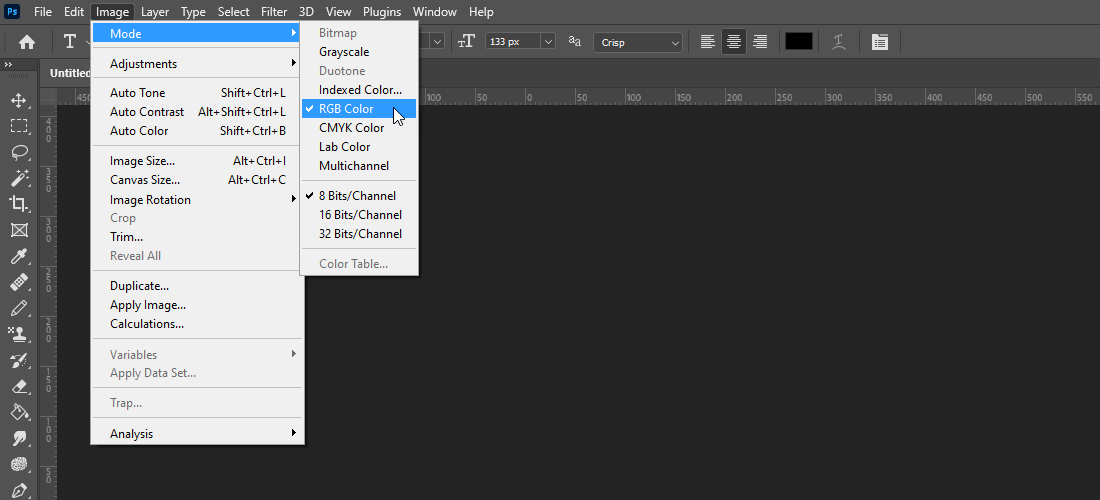
Your color mode might be set to GrayScale. Go to Image -> Mode and make sure that it is checked to at least RGB.

Thats all I can think of.
  • reaper
  • Proficient
  • Proficient
  • User avatar
  • Joined: Apr 05, 2005
  • Posts: 435
  • Loc: europe
  • Status: Offline

Post September 28th, 2005, 3:29 am

Thanks man! You helped me out big time 8)

Post Information

  • Total Posts in this topic: 3 posts
  • Users browsing this forum: kiro_789+ and 35 guests
  • You cannot post new topics in this forum
  • You cannot reply to topics in this forum
  • You cannot edit your posts in this forum
  • You cannot delete your posts in this forum
  • You cannot post attachments in this forum


© 2011 Unmelted, LLC. Ozzu® is a registered trademark of Unmelted, LLC.