How do I create Star Wars "perspective"

  • TraciV
  • Born
  • Born
  • No Avatar
  • Joined: Jan 06, 2010
  • Posts: 3
  • Status: Offline

Post January 6th, 2010, 3:59 pm

Hi,

I stumbled across a Star Wars post from a few years ago while searching for a font, and am wondering if someone can help me...

My son is doing a project for school and is using Star Wars for his theme. I found the right font, but he wants the words to have the perspective that they are floating in space - like they have in the opening of the movie, but I'm not sure how to do it - other than using fonts of increasing size. I am by no means a digital art "expert", but I am very familiar with Corel Draw and Microsoft Office if someone can just give me some easy to use instructions - can you help me out?

digital-art-forum/remember-the-font-t63911.html

Thanks, Traci
  • Anonymous
  • Bot
  • No Avatar
  • Joined: 25 Feb 2008
  • Posts: ?
  • Loc: Ozzuland
  • Status: Online

Post January 6th, 2010, 3:59 pm

  • SpooF
  • ٩๏̯͡๏۶
  • Bronze Member
  • User avatar
  • Joined: May 22, 2004
  • Posts: 3415
  • Loc: Richland, WA
  • Status: Offline

Post January 6th, 2010, 5:13 pm

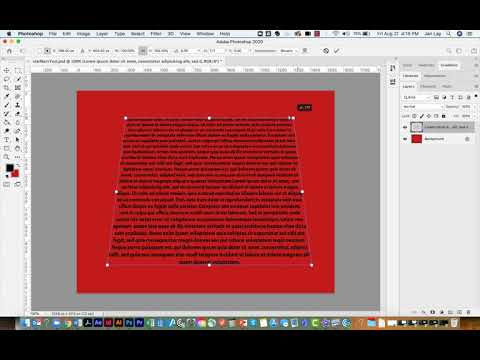
What you want to do is change the perceptive of the font. Heres a video tutorial for photoshop, but any image editing software will have this for the most part.

There are some free alternatives to photoshop such as Paint .Net and Gimp. Paint .Net is a "clone" of photoshop.

http://www.youtube.com/watch?v=8dKTEU9Ko9U

LOL @ 2m
#define NULL (::rand() % 2)
  • ATNO/TW
  • Super Moderator
  • Super Moderator
  • User avatar
  • Joined: May 28, 2003
  • Posts: 23404
  • Loc: Woodbridge VA
  • Status: Offline

Post January 6th, 2010, 5:37 pm

Thanks spoof. I was going to put a brief tute on that together. That makes it easy. Had to chuckle at the drop shadow "because you can" bit. lol That's how you do it TraciV
"There's no place like 127.0.0.1 except for ::1."
Alexandria Networks. Leader in IT consulting for associations/non-profits, and small to medium sized businesses around the northern Virginia and Washington D.C. metro area.
  • joebert
  • Sledgehammer
  • Genius
  • No Avatar
  • Joined: Feb 10, 2004
  • Posts: 13455
  • Loc: Florida
  • Status: Offline

Post January 6th, 2010, 5:49 pm

Here's something on perspective specifically for Corel Draw.
http://www.corel.com/servlet/Satellite? ... 7022732881

I use Macromedia/Adobe Fireworks. With that I would use the "Distort" tool (Q hotkey)
Strong with this one, the sudo is.
  • TraciV
  • Born
  • Born
  • No Avatar
  • Joined: Jan 06, 2010
  • Posts: 3
  • Status: Offline

Post January 6th, 2010, 9:28 pm

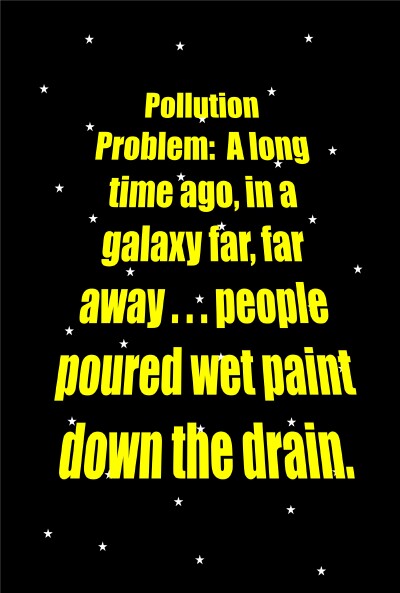
Thanks! It worked in Corel... and it looks AWESOME! See my attachment below! Thanks so much for the help!
Attachments:
sm paint wars[1].jpg

here it is - we did the solution too!

Post Information

  • Total Posts in this topic: 5 posts
  • Users browsing this forum: No registered users and 65 guests
  • You cannot post new topics in this forum
  • You cannot reply to topics in this forum
  • You cannot edit your posts in this forum
  • You cannot delete your posts in this forum
  • You cannot post attachments in this forum


© 2011 Unmelted, LLC. Ozzu® is a registered trademark of Unmelted, LLC.