Ibm Thinkpad T23 Boot Problem

  • kommie2000
  • Born
  • Born
  • No Avatar
  • Joined: Aug 10, 2006
  • Posts: 1
  • Status: Offline

Post August 10th, 2006, 10:53 am

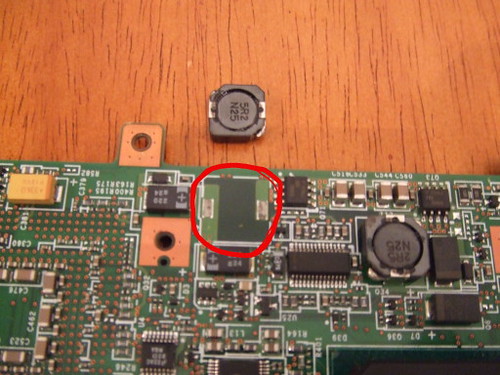
My T23 is having the same issue. I took it completely apart and the piece you have pictured was lying on the bottom of the case. any idea on which side goes to which solder point, or does it even matter?

Also, if you say that your piece is tight I would still remove it and resolder it. Examining the solder points under a jeweler's loope I can see where there was still flux under the joint and this would prevent the solder for connecting even though it would look like it was.

Wonder if we can go after IBM for this? It's obvious there was a manufacturing defect when these boards were made.
  • Anonymous
  • Bot
  • No Avatar
  • Joined: 25 Feb 2008
  • Posts: ?
  • Loc: Ozzuland
  • Status: Online

Post August 10th, 2006, 10:53 am

  • pcardoso73
  • Born
  • Born
  • No Avatar
  • Joined: Aug 30, 2006
  • Posts: 1
  • Loc: Portugal
  • Status: Offline

Post August 30th, 2006, 7:30 am

Hi all,

I also own a IBM T23 laptop and have a similar problem. My T23 boots fine and works fine, but if you apply a little pressure to the memory's area it chrashes. Sometimes it crashes before BIOS comes up, other times during OS load or during normal operation. It can take 1 hour to crash or 10 seconds.
When it crashes it just have to shake it a bit, or apply pressure to some points and it is back again, till I move the PC or something that makes it crash once more.

I changed HD and memory, and I figured out that must be the motherboard. I suspect that could be broken tracks on the memory BUS, but can't tell for sure. Any suggestions ? Well, I'll try to take it apart and check all soldering points.

If anybody can help, please reply.

Best regards,

Pedro Cardoso
  • Joergen
  • Born
  • Born
  • No Avatar
  • Joined: Oct 02, 2006
  • Posts: 1
  • Status: Offline

Post October 2nd, 2006, 6:26 am

I registered just to thank twmspro for the solution to the no power / fan-pulse problem.

My friend's T23 died just like that and I took it apart (what a chore!) as per the IBM manual and sure enough the little bugger underneath the mainboard (hardest part to get to naturally) was partially severed.

I knew its probably a sensitive multilayered board so I took the mainboard to a tv repair shop and they soldered it back in place soldered another one also and put epoxy glue to hold them in place in the future.

The laptop works like a charm now.

Thank you!
  • tarabas
  • Born
  • Born
  • No Avatar
  • Joined: Oct 21, 2006
  • Posts: 3
  • Loc: Germany
  • Status: Offline

Post October 24th, 2006, 8:38 am

Hi all,

I just recognized the same problem on my T23. Sometimes after a week or so it booted and worked fine - maybe for a week or more but then surely crashes again leaving the fan run up and down and nothing else.

After first observation of the mainboard there was no obvious problem as described above. But before I decided to reassemble all I used slightly more force on the "magnet part" which is an inductor from one of the many converters on that board, violá I had it in my fingers!

Inspection showed a electromigration problem which separates the surface layer from the copper thus loosing the part and/or blocking current occasionally.

After that I smoothly jiggled all three parts of the same kind and found another one on the upper mainboard side which also wasn't as fix as should be.

After bearding off the pins (until I saw pure nice copper) an soldering them back to the board - guess what - everything was fine again 8)

Thanks to twmspro and all other to work out and report that problem here.

If anyone is interested in further details please pm me.

regards, tarabas
  • Geomarc
  • Born
  • Born
  • No Avatar
  • Joined: Oct 25, 2006
  • Posts: 1
  • Loc: ROMANIA
  • Status: Offline

Post October 25th, 2006, 10:09 am

Hy to all,
After I read all the posts I realized that I have the same problem with my think pad T23 (fan run up and down and nothing else). I disassembled my laptop and I solder the "magnet part" to the motherbord.
Unfortunatly my laptop has the same problem.

I 'm afraid to not solder the "magnet part" on properly way.(+/-)

Any help will be useful. thank you.!
  • hylai
  • Born
  • Born
  • No Avatar
  • Joined: Nov 08, 2006
  • Posts: 2
  • Status: Offline

Post November 8th, 2006, 10:22 pm

twmspro wrote:
Alright. Well i've permanently found the problem. This requires that you disassemble the notebook solder a piece back on, and put it back together.

The motherboard had a magnet-looking piece that got pulled off the mobo. Soldering this back on will solve the problem. When I get home from school I will post pictures and instructions on how to get this solved. (Hopefully the other piece just like it doesn't fall off. Thanks see you in 4-5 hours.


Thanks twmspro your solution saved my $$$

I never fix a notebook computer before, but when I found this topic from a search engine with keyword "cannot boot T23 fan", I am delighted at least someone is having the same problem as I encounter and I might have a chance to fix it instead of getting a new one.

I following instruction available in the following link, for R40, to disassemble my T23:
http://www.quepublishing.com/articles/a ... Num=3&rl=1

It is close enough to guide you through.

The problem component, magnet like thing (2R5 N24 for my T23), is at the back of the mother board. so you have to disassemble the whole notebook completely.......

After soldering back the "magnet" to the mother board, it works and problem resolved.....


Thanks again everyone.
  • hylai
  • Born
  • Born
  • No Avatar
  • Joined: Nov 08, 2006
  • Posts: 2
  • Status: Offline

Post November 8th, 2006, 10:28 pm

Geomarc wrote:
Hy to all,
After I read all the posts I realized that I have the same problem with my think pad T23 (fan run up and down and nothing else). I disassembled my laptop and I solder the "magnet part" to the motherbord.
Unfortunatly my laptop has the same problem.

I 'm afraid to not solder the "magnet part" on properly way.(+/-)

Any help will be useful. thank you.!


When I solder my "magnet", the foot of the model number "2R5 N24" is closer to the mother boards edge.
  • twmspro
  • Expert
  • Expert
  • User avatar
  • Joined: Nov 03, 2003
  • Posts: 591
  • Loc: Indiana
  • Status: Offline

Post November 9th, 2006, 8:59 am

I'm glad I could help you. The T23's are nice little laptops. Very sturdy seems like to me. Glad I could help.
  • Koala
  • Born
  • Born
  • No Avatar
  • Joined: Nov 10, 2006
  • Posts: 2
  • Status: Offline

Post November 10th, 2006, 4:11 am

twmspro wrote:
I'm glad I could help you. The T23's are nice little laptops. Very sturdy seems like to me. Glad I could help.


Yeah thanks very much! Managed to fix my mates laptop using this useful info! Now working perfectly.
For those who are asking the part is a coil so it doesn't matter which way it is connected. Also the one that
fell off in my laptop was not the one featured in the picture earlier in this thread. It was very nearby on the
board and the coil looked exactly the same. So they obviously have a problem with poor solder joints on these
machines!

Thanks Again
Kev. :iconthumbleft:
  • danteisbadass
  • Born
  • Born
  • No Avatar
  • Joined: Nov 21, 2006
  • Posts: 1
  • Status: Offline

Post November 21st, 2006, 7:29 am

when i start mine up, it goes to this text screen saying "media test failure" and "operating system not found" and doesnt go anywhere after that. once or twice its actually gone to windows, but only lasted about ten minutes before going to a blue screen that says "beginning physical memory dump" and i didnt like the sound of that, so i shut the computer off, and after that it would go back to not finding my operating system. what the hell do i do?
  • Koala
  • Born
  • Born
  • No Avatar
  • Joined: Nov 10, 2006
  • Posts: 2
  • Status: Offline

Post November 22nd, 2006, 3:02 am

danteisbadass wrote:
when i start mine up, it goes to this text screen saying "media test failure" and "operating system not found" and doesnt go anywhere after that. once or twice its actually gone to windows, but only lasted about ten minutes before going to a blue screen that says "beginning physical memory dump" and i didnt like the sound of that, so i shut the computer off, and after that it would go back to not finding my operating system. what the hell do i do?


Sounds like the hard drive is knackered! It is located behind panel that covers the jack plugs, held in by large screw underneath. Replace it but you will need to completely reload the operating system!
  • suri
  • Born
  • Born
  • No Avatar
  • Joined: Dec 13, 2006
  • Posts: 1
  • Status: Offline

Post December 13th, 2006, 8:59 am

Thanks twmspro, I had the same problem (fan low/high and no boot) and with your help I have been able to run my old T23 again. :) I was thinking to sell it off ebay as a faulty laptop but now its all working. When I opened my laptop the magnet like part was completely detached and was lying in the casing. This is definitely a manufacturing issue and should be reported to ibm. Now I am thinking about buying similar laptops off ebay to make some money :D

Cheers!
  • psisk
  • Born
  • Born
  • No Avatar
  • Joined: Dec 22, 2006
  • Posts: 1
  • Status: Offline

Post December 22nd, 2006, 7:40 pm

Can someone post the pics again of what to look for once I disassemble the laptop and exactly where to look? Much appreciated.

This really is one great thread!
  • mhammett
  • Born
  • Born
  • No Avatar
  • Joined: Dec 26, 2006
  • Posts: 1
  • Status: Offline

Post December 26th, 2006, 9:42 am

twmspro wrote:
Top of the magnet-looking piece
Image

Bottom of the magnet looking piece
Image

The place on the motherboard where it goes
Image

I'm not sure if these pictures are too big or not but i'll check the rules in a bit here. Here are the pictures for now. If you need more info ask me.

REUPLOADED PICTURES!


These pictures no longer load. Could someone post some new ones?
  • yvon
  • Born
  • Born
  • No Avatar
  • Joined: Jan 12, 2007
  • Posts: 1
  • Status: Offline

Post January 12th, 2007, 9:41 pm

Thank you very much twmspro my t23 was doing the same boot problem i check the little magnet type and it fix my problem i weld it back.Its perfect............YOUR THE MAN
  • Anonymous
  • Bot
  • No Avatar
  • Joined: 25 Feb 2008
  • Posts: ?
  • Loc: Ozzuland
  • Status: Online

Post January 12th, 2007, 9:41 pm

Post Information

  • Total Posts in this topic: 112 posts
  • Users browsing this forum: No registered users and 71 guests
  • You cannot post new topics in this forum
  • You cannot reply to topics in this forum
  • You cannot edit your posts in this forum
  • You cannot delete your posts in this forum
  • You cannot post attachments in this forum


© 2011 Unmelted, LLC. Ozzu® is a registered trademark of Unmelted, LLC.