Ibm Thinkpad T23 Boot Problem

  • twmspro
  • Expert
  • Expert
  • User avatar
  • Joined: Nov 03, 2003
  • Posts: 591
  • Loc: Indiana
  • Status: Offline

Post November 26th, 2005, 3:38 pm

I have a friends sisters Thinkpad with me and it has a severe problem. When you turn it on the fan speed goes up and down. Nothing else happens. The hard drive does not even start. The power-on light comes on which it should when it would function normally any how. I completely took the laptop apart and nothing likes out of the ordinary. I disconnected the screen connection to the mobo and it cleaned it. As in blowing air onto it then firmly reseated the connection. My friend and I assume it is the screen because when it ran for the last time pixelation started to happen and the colors on the screen became all funky looking. I will post a video later on showing what happens when you try to boot the machine now. I removed all parts and ran the system. The same thing happened. I am hoping it is not the system main board because the owner of the laptop leaves town tomorrow night. When I get home I will post video. Also I will post specs. Thanks in advance.

Added Info:
Video Link here

Video showing what is going on the fan speeds up then slows down then it repeats. Watch and you'll see what i mean. Sorry for the crappy quality and the portugesse in the background. Grandma's going deaf.

Specs: P3 1.13Ghz, 256MB Ram, 30GB HDD, Dvd drive, Battery, Windows 2000(Doesnt apply now), Used by at least 2 owners.

I tore it apart (very carefully) and everything looks fine. Took off the heatsink cleaned off the processor and heatsink. Hardly any grease was left. Recoated with Arctic Silver Ceramiqe. (Very good I might add) Everything looks fine.

A list of what is not the problem. (Checked many times):
    Hard Drive, Fan, Ram, Network, Moden, Screen, Dvd drive, battery, keyboard, trackpad.

    What has been done:
    Repasted Cpu, Cleaned connections, Checked for loose connections, and Ran in minimal configuration. No nothing. Everything taken out. Ram all of it. Just the main board and the screen. But of course I tried with battery in and battery out running off of wall power.


Once again thanks in advance. If you need more pictures I would be happy to give them to you. If you want to look for pleasure go right ahead. Lol. Thanks a lot!


...This is a long freakin post.
  • Anonymous
  • Bot
  • No Avatar
  • Joined: 25 Feb 2008
  • Posts: ?
  • Loc: Ozzuland
  • Status: Online

Post November 26th, 2005, 3:38 pm

  • travisleesmith
  • Born
  • Born
  • No Avatar
  • Joined: Feb 12, 2006
  • Posts: 1
  • Status: Offline

Post February 12th, 2006, 9:58 am

just wondering if you ever figured out what the hell is happening with the t23 thinkpad, my fan slows and speeds up as well and will not boot. can suggestions?

_travislee.
  • twmspro
  • Expert
  • Expert
  • User avatar
  • Joined: Nov 03, 2003
  • Posts: 591
  • Loc: Indiana
  • Status: Offline

Post February 12th, 2006, 11:33 am

Ya. We never figured out what was wrong with it. But the owner now has a new notebook that works so i'm free to do whatever with the t23. We think it is a serious hardware problem. We shall see. As of right now I have no solution. I'll try to get it sometime next week and see what i can do with it.
  • gigelypop
  • Born
  • Born
  • No Avatar
  • Joined: Feb 22, 2006
  • Posts: 1
  • Status: Offline

Post February 22nd, 2006, 11:59 am

Hi,

I have the exact same problem with my IBM T23 Laptop. Fan lowering and rising speed and no sign of the hardrive even concidering to boot. Would be great if a solution appears.

Thanks All.
  • twmspro
  • Expert
  • Expert
  • User avatar
  • Joined: Nov 03, 2003
  • Posts: 591
  • Loc: Indiana
  • Status: Offline

Post February 25th, 2006, 9:04 pm

I've got good news. Not

The only way i can get it to work is to hold up vertically but a little bit toward your self. Then turn it on that way. If you move it past 90" degrees it shuts off the hard drive and the fan starts doing that wierd stuff. There seems to be a lot of problems like this with these notebooks. Good luck all. I'm am thinking there is a motion sensor inside of the notebook. Much like the ones in the new Apple Powerbooks. Good luck. I'll keep you updated on this.
  • twmspro
  • Expert
  • Expert
  • User avatar
  • Joined: Nov 03, 2003
  • Posts: 591
  • Loc: Indiana
  • Status: Offline

Post February 28th, 2006, 10:57 am

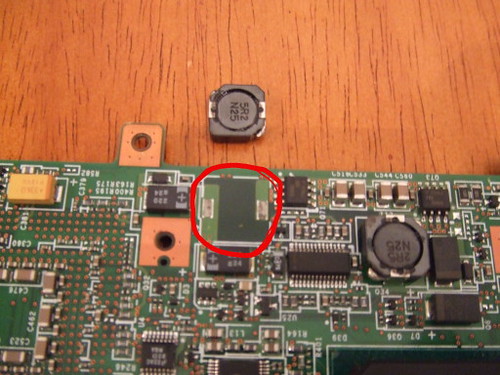
Alright. Well i've permanently found the problem. This requires that you disassemble the notebook solder a piece back on, and put it back together.

The motherboard had a magnet-looking piece that got pulled off the mobo. Soldering this back on will solve the problem. When I get home from school I will post pictures and instructions on how to get this solved. (Hopefully the other piece just like it doesn't fall off. Thanks see you in 4-5 hours.
  • PassportOne
  • Born
  • Born
  • No Avatar
  • Joined: Mar 07, 2006
  • Posts: 1
  • Status: Offline

Post March 7th, 2006, 1:21 pm

Any updates regarding this problem?

Could you post the pictures?

I'm having the same problem and could not find the "magnet" looking piece you were referring to.
  • twmspro
  • Expert
  • Expert
  • User avatar
  • Joined: Nov 03, 2003
  • Posts: 591
  • Loc: Indiana
  • Status: Offline

Post March 7th, 2006, 3:46 pm

Top of the magnet-looking piece
Image

Bottom of the magnet looking piece
Image

The place on the motherboard where it goes
Image

I'm not sure if these pictures are too big or not but i'll check the rules in a bit here. Here are the pictures for now. If you need more info ask me.

REUPLOADED PICTURES!
  • al_ngl
  • Beginner
  • Beginner
  • User avatar
  • Joined: Oct 11, 2005
  • Posts: 35
  • Loc: Indiana
  • Status: Offline

Post March 7th, 2006, 9:23 pm

Kudos on the fix. That lappy works pretty well with XP now. I wish I could get a free laptop.
  • thinkpad23
  • Born
  • Born
  • No Avatar
  • Joined: Mar 12, 2006
  • Posts: 2
  • Status: Offline

Post March 12th, 2006, 2:24 pm

I had the same problem with the laptop, and I took the entire thing apart and checked...that piece is on the mother board and is secure...all of its "symptoms" are exactly the same as the topic creator. What could be the problem? I really like the pc and dont want to have to get rid of it.


Thanks

Jon
  • twmspro
  • Expert
  • Expert
  • User avatar
  • Joined: Nov 03, 2003
  • Posts: 591
  • Loc: Indiana
  • Status: Offline

Post March 12th, 2006, 2:36 pm

I heard that if you leave it unplugged and with the battery taken out for about a week then you will get some more life out of it. I would take out the hdd see if it boots. Try running with minimal setup. The system itself, 1 ram stick, and the hard drive. Try that and report back.

Also some specs would be nice. (exp:cpu,ram...)
  • thinkpad23
  • Born
  • Born
  • No Avatar
  • Joined: Mar 12, 2006
  • Posts: 2
  • Status: Offline

Post March 12th, 2006, 4:15 pm

Ok I found something very interesting...

When I apply pressure to the section with the thinkpad button, and volume controls, the pc boots. Then I read this on another site:

http://martigny.ai.mit.edu/hypermail/th ... /0089.html

TK wrote:


>I reached a solution regarding the T23 that would usually fail to boot (no Thinkpad screen appeared). (Some new questions are at the bottom.)
>
>After much experimenting, I narrowed in on a general area under the case that, if I applied pressure during startup, the machine would be more likely to reach the Thinkpad screen (and then continue to boot).
>
>The Hardware Maintenance Manual said, "1. Reseat DIMM's. 2. Replace system board." I tried reseating and even removing the DIMM's, but this did not change the behavior. Under a similar symptom, the Manual also suggested checking all connections.
>
>I gave up for a while, and just left the machine running at all times, rather than deal with trying to boot 30 times in a row.
>
>One day, while the computer was running, I noticed that the wireless adapter was unavailable (I hadn't tried using it in a while, so I hadn't noticed its absence). (Note that the modem was still working fine.) After fiddling with things on the software driver side to no avail, it occurred to me that this might be related to the boot problem. Indeed, an area where pressure often helped get the machine to start was right under the mini PCI cover, where the T23's wireless/modem combo adapter is housed.
>
>I opened the mini PCI cover and examined the connections. No obvious problems. I removed the wireless/modem combo adapter from the mini PCI slot...eureka, the machine boots perfectly every time! So, I finally found the trouble spot.
>
>I reconnected the wireless/modem combo adapter, and experimented again with pressure spots, on the adapter itself. One spot in particular gave me better odds of success than others. It's a spot not near the connecting cord nor near the mini PCI slot. Just a random slot near the center of the edge furthest away from the mini PCI slot. It's hard to tell what this might relate to, because the wireless adapter has an opaque plastic covering that prevents visual inspection of the circuits on the card.
>
>So...what might the actual problem be? A loose contact on the printed circuit board of the wireless/modem combo adapter? OR, a problem with the mini PCI interface on the PC itself? Whatever it was caused intermittent inability of the machine to boot, also rendering the wireless component of the card unavailable - yet the modem component of the card always worked fine.
>
>Would it be easy to find a cheap or free mini PCI wireless/modem combo adapter to try in the machine to see if it works? Should I be looking for "broken" T23's to salvage parts from? Are some PCI wireless/modem combo adapters going to be compatible with my T23, yet others won't? Would attempting to repair the adapter be an option, or pointless?
>
>(My T23 model has: "Mini PCI 802.11b wireless, Intersil. Prism 2.5 chipset, diversity antennas in display cover, Wi-Fi-certified / 56K6 V.90 modem combo, Lucent. chipset")
>
>Thanks to everyone who gave suggestions.

-------------------------

That is what I found...this really seems to be the problem...what is the next step with this solution?

Thanks

Jon

Specs: P3 1 Ghz, 256MB Ram, 30GB HDD, Dvd drive, Battery, Windows XP SP 2
  • twmspro
  • Expert
  • Expert
  • User avatar
  • Joined: Nov 03, 2003
  • Posts: 591
  • Loc: Indiana
  • Status: Offline

Post March 12th, 2006, 7:36 pm

One thing you could do is completely take the notebook apart. Check the solder points on the motherboard and if any are loose solder them back in. Just be careful not to solder points back together that aren't supposed to be together. Basically solder carefully.
  • c2h5oh
  • Born
  • Born
  • No Avatar
  • Joined: Mar 19, 2006
  • Posts: 1
  • Status: Offline

Post March 19th, 2006, 2:06 pm

I've got the same problem here. It's not minipci, ram or hdd. The magnet looking piece was loose - the moment I touched it I had to solder it back on. Sadly it didn't help at all. If anybody could give me any other idea what to do I'd really apreciate it.
  • chonga
  • Born
  • Born
  • No Avatar
  • Joined: Jul 10, 2006
  • Posts: 1
  • Status: Offline

Post July 10th, 2006, 11:09 am

i am also having this same exact problem.

has anyone found a fix yet?
  • Anonymous
  • Bot
  • No Avatar
  • Joined: 25 Feb 2008
  • Posts: ?
  • Loc: Ozzuland
  • Status: Online

Post July 10th, 2006, 11:09 am

Post Information

  • Total Posts in this topic: 112 posts
  • Users browsing this forum: No registered users and 61 guests
  • You cannot post new topics in this forum
  • You cannot reply to topics in this forum
  • You cannot edit your posts in this forum
  • You cannot delete your posts in this forum
  • You cannot post attachments in this forum


© 2011 Unmelted, LLC. Ozzu® is a registered trademark of Unmelted, LLC.