explorer.exe error in Vista

  • NRJ
  • Graduate
  • Graduate
  • User avatar
  • Joined: Jan 05, 2007
  • Posts: 110
  • Status: Offline

Post May 12th, 2007, 7:17 pm

When i browse for files or try to move stuff i get an error. it is getting a bit annoying now.


Problem signature:
Problem Event Name: APPCRASH
Application Name: Explorer.exe
Application Version: 6.0.6000.16386
Application Timestamp: 4549b091
Fault Module Name: StackHash_26e1
Fault Module Version: 6.0.6000.16386
Fault Module Timestamp: 4549bdc9
Exception Code: c0000374
Exception Offset: 000af1c9
OS Version: 6.0.6000.2.0.0.256.1
Locale ID: 1033
Additional Information 1: 26e1
Additional Information 2: cd7bb394943cdbaea1ff4c088c0e7665
Additional Information 3: ff16
Additional Information 4: 63fd24ff58eaa0cc8d153a6dbda24ae8

Read our privacy statement:
http://go.microsoft.com/fwlink/?linkid= ... cid=0x0409
  • Anonymous
  • Bot
  • No Avatar
  • Joined: 25 Feb 2008
  • Posts: ?
  • Loc: Ozzuland
  • Status: Online

Post May 12th, 2007, 7:17 pm

  • Alkatr0z
  • Mastermind
  • Mastermind
  • No Avatar
  • Joined: Feb 08, 2004
  • Posts: 1883
  • Loc: Adelaide, Australia
  • Status: Offline

Post May 12th, 2007, 10:48 pm

Can you please post the information from following these steps?

Quote:
Open the start menu. Click All Programs. Select "Maintenance". Select "Problems Reports and Solutions". Click "View Problem History". Look for the crash/error in question. Double-click the report in question. What is that data?


Sourced from here:http://zachd.com/pss/pss.html#bucket
  • NRJ
  • Graduate
  • Graduate
  • User avatar
  • Joined: Jan 05, 2007
  • Posts: 110
  • Status: Offline

Post May 12th, 2007, 11:03 pm

Product
Windows Explorer

Problem
Stopped working

Date
5/12/2007 10:11 PM

Status
Not Reported

Problem signature
Problem Event Name: APPCRASH
Application Name: Explorer.exe
Application Version: 6.0.6000.16386
Application Timestamp: 4549b091
Fault Module Name: StackHash_26e1
Fault Module Version: 6.0.6000.16386
Fault Module Timestamp: 4549bdc9
Exception Code: c0000374
Exception Offset: 000af1c9
OS Version: 6.0.6000.2.0.0.256.1
Locale ID: 1033
Additional Information 1: 26e1
Additional Information 2: cd7bb394943cdbaea1ff4c088c0e7665
Additional Information 3: ff16
Additional Information 4: 63fd24ff58eaa0cc8d153a6dbda24ae8
  • NRJ
  • Graduate
  • Graduate
  • User avatar
  • Joined: Jan 05, 2007
  • Posts: 110
  • Status: Offline

Post May 15th, 2007, 7:03 am

NRJ wrote:
Product
Windows Explorer

Problem
Stopped working

Date
5/12/2007 10:11 PM

Status
Not Reported

Problem signature
Problem Event Name: APPCRASH
Application Name: Explorer.exe
Application Version: 6.0.6000.16386
Application Timestamp: 4549b091
Fault Module Name: StackHash_26e1
Fault Module Version: 6.0.6000.16386
Fault Module Timestamp: 4549bdc9
Exception Code: c0000374
Exception Offset: 000af1c9
OS Version: 6.0.6000.2.0.0.256.1
Locale ID: 1033
Additional Information 1: 26e1
Additional Information 2: cd7bb394943cdbaea1ff4c088c0e7665
Additional Information 3: ff16
Additional Information 4: 63fd24ff58eaa0cc8d153a6dbda24ae8


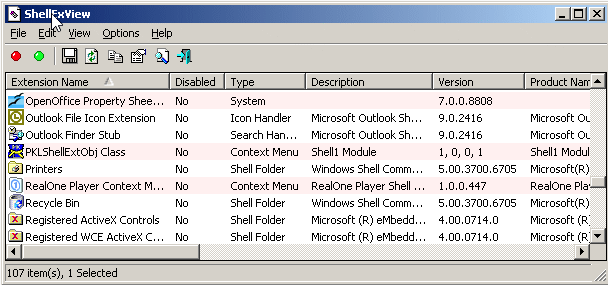
i think i found what caused it. it was zipgenius program drag and and drop. so I disabled it with shellexview (nice utility).
  • Alkatr0z
  • Mastermind
  • Mastermind
  • No Avatar
  • Joined: Feb 08, 2004
  • Posts: 1883
  • Loc: Adelaide, Australia
  • Status: Offline

Post May 17th, 2007, 8:13 am

Hmm interesting I saw a similar post when I was searching for stuff on this error which mentioned Zip Genius as the culprit. It had a different faulting module from this though I remember.
  • blitza
  • Born
  • Born
  • No Avatar
  • Joined: May 23, 2007
  • Posts: 1
  • Status: Offline

Post May 23rd, 2007, 3:13 pm

Hi I have exactly the same error when explorer closes.
This happens especially when the mouse passes over zip files (rar files rarely). It's not necessary to select the file, only "touch" and explorer closes. I like zipgenius and I use it for a long time, do I have to go for another similar program? If uninstalled the problem is sovled? Hope there is another way. What exactly does ShellExView do? I have a new computer and would't like to install trash on it, is there another way like change zipgenius configuration? I would appreciate any help :)
  • grinch2171
  • Moderator
  • Genius
  • User avatar
  • Joined: Feb 11, 2004
  • Posts: 6737
  • Loc: Martinsburg, WV
  • Status: Offline

Post May 24th, 2007, 4:07 am

I personally use 7zip. It is a very powerful free zip utility. Worth checking out if zipgenus is having issues.

http://www.7-zip.org/
‎"Be polite, be professional, but have a plan to kill everybody you meet." Maj. Gen. James Mattis
  • erhoni
  • Born
  • Born
  • No Avatar
  • Joined: Jun 13, 2007
  • Posts: 1
  • Status: Offline

Post June 13th, 2007, 1:06 pm

I have a problem that looks like this but I get the error when my vista loads up
he says that:
Problem signature:

Problem Event Name: APPCRASH

Application Name: Explorer.exe

and it wont let me do anything else exept from restarting the "program"
what should i do

P.S.
I'm writing from my dads laptop
  • Alkatr0z
  • Mastermind
  • Mastermind
  • No Avatar
  • Joined: Feb 08, 2004
  • Posts: 1883
  • Loc: Adelaide, Australia
  • Status: Offline

Post June 13th, 2007, 6:37 pm

Are you running any programs that integrate with the Vista shell? Like to use the example for Zip Genius. It integrates with the shell so they can right click on a file and select to compress it with Zip Genius. Are you running anything that gives you something more than the standard options that appeared when you right clicked?

If you can boot up into safe mode you can check event viewer for the full error information.

Open the Start menu. Click All Programs. Select "Maintenance". Select "Problems Reports and Solutions". Click "View Problem History". Look for the crash/error in question. Double-click the report in question. What is that data? (You can use "Copy to Clipboard" to easily include this data in your message.)
  • jassas
  • Born
  • Born
  • No Avatar
  • Joined: Jun 23, 2007
  • Posts: 1
  • Status: Offline

Post June 23rd, 2007, 8:16 am

Ok. i have the same problem, but its not because i have Zip Genius. Whenever i logon, a few seconds later it says that windows explorer has stopped working. it asks if i want to restart the program or check online for a solution. when it restarts it just says that same thing a 2 seconds. what do i do?

Here's the information:

Product
Windows Explorer

Problem
Stopped working

Date
6/23/2007 10:57 AM

Status
More information available

Problem signature
Problem Event Name: APPCRASH
Application Name: Explorer.EXE
Application Version: 6.0.6000.16386
Application Timestamp: 4549b091
Fault Module Name: gbjkog.dll_unloaded
Fault Module Version: 0.0.0.0
Fault Module Timestamp: 466e9e06
Exception Code: c0000005
Exception Offset: 02581985
OS Version: 6.0.6000.2.0.0.256.1
Locale ID: 1033
Additional Information 1: 8d13
Additional Information 2: cdca9b1d21d12b77d84f02df48e34311
Additional Information 3: 8d13
Additional Information 4: cdca9b1d21d12b77d84f02df48e34311

Extra information about the problem
Bucket ID: 446912290
  • thni
  • Born
  • Born
  • No Avatar
  • Joined: Jun 25, 2007
  • Posts: 1
  • Status: Offline

Post June 25th, 2007, 4:07 am

Hi ... i've been looking for an answer to the appcrash and explorer.exe error on vista ... on an other site I found the answer that it has something to do with installations or upgrades that changes *.cpl files in the c:\windows\system32 dir ... I also found a guy who'd called MS and got a tip to use an antispyware program ... and it works for a friend ... I don't know why, it's not logic.
Try it ... http://www.superantispyware.com/

It's not a comercial and the program is free.
  • kish
  • Born
  • Born
  • No Avatar
  • Joined: Jun 25, 2007
  • Posts: 1
  • Status: Offline

Post June 25th, 2007, 1:00 pm

Hey I've had the same Explorer Appcrash problem (Application Version: 6.0.6000.16386) - its a killer... BUT Thni's solution WORKED! I was using AdAware to get rid of spyware, but SuperAntiSpyware gets rid of ALL spyware... I wasn't even sure if it was a spyware problem causing the Appcrash, but after scanning and removing harmful items using SuperAntiSpyware, my Windows Explorer started working GREAT again!

Thanks thni - it worked!
  • hoogal2
  • Born
  • Born
  • No Avatar
  • Joined: Jul 29, 2007
  • Posts: 1
  • Status: Offline

Post July 29th, 2007, 2:11 am

Yesterday my buddy just got this problem, I solved it a different way.
I went into his task maneger (alt+Ctrl+Del) went to file in the action bar
opened the run command. after this i just searched for the file make sure
that you change the file type your looking for form program to all files go to
c: [Windows] [system32] [what ever the fault modular name is ] ounce you
find this file I deleted the one on my buddys computer and I restarted and
that was it the error stoped showing up i ran a few spyware and antivireses
didn't find any trace of any vireses.

hoogal2
  • frettbottx
  • Born
  • Born
  • No Avatar
  • Joined: Apr 08, 2008
  • Posts: 1
  • Status: Offline

Post April 8th, 2008, 2:20 pm

hello all im new here!
please help me.i got a problem, about crashes in vista, when i click MY COMPUTER icon, and clicked Harddrive C: it says WINDOWS EXPLORER HAD STOPPED WORKING. the report is loke this:

Problem signature:
Problem Event Name: BEX
Application Name: explorer.exe
Application Version: 6.0.6000.16549
Application Timestamp: 46d230c5
Fault Module Name: FLVSplitter.ax
Fault Module Version: 1.0.0.2
Fault Module Timestamp: 46efe0ca
Exception Offset: 00025722
Exception Code: c000000d
Exception Data: 00000000
OS Version: 6.0.6000.2.0.0.768.2
Locale ID: 1033
Additional Information 1: 9e6d
Additional Information 2: e4ee1507257f3e497243003f5b7d5db3
Additional Information 3: 565b
Additional Information 4: 232fef43701c7d837254e4f62f502e5a

Read our privacy statement:
http://go.microsoft.com/fwlink/?linkid= ... cid=0x0409


please help me! i just bought this pc about a week. and the last thing that i've ever done is i downloaded a FLV file using bitcomet torrent. and then i want to open C: , it crashes. please help....
  • Zarius
  • Born
  • Born
  • No Avatar
  • Joined: Mar 05, 2009
  • Posts: 1
  • Status: Offline

Post March 5th, 2009, 9:08 am

I have the same problem but more difficult. I cant open my file bars (data disc C, my computer....) but internet is working it started when i install K-lite codec pack

Description
A problem caused this program to stop interacting with Windows.

Problem signature
Problem Event Name: AppHangB1
Application Name: explorer.exe
Application Version: 6.0.6001.18000
Application Timestamp: 47918e5d
Hang Signature: 8c88
Hang Type: 0
OS Version: 6.0.6001.2.1.0.768.3
Locale ID: 1051
Additional Hang Signature 1: 282468148142b71d8cc88da84885b302
Additional Hang Signature 2: d957
Additional Hang Signature 3: 007b545d20970b83f419a6ac12ebe63b
Additional Hang Signature 4: 8c88
Additional Hang Signature 5: 282468148142b71d8cc88da84885b302
Additional Hang Signature 6: d957
Additional Hang Signature 7: 007b545d20970b83f419a6ac12ebe63b

Extra information about the problem
Bucket ID: 196212213
  • Anonymous
  • Bot
  • No Avatar
  • Joined: 25 Feb 2008
  • Posts: ?
  • Loc: Ozzuland
  • Status: Online

Post March 5th, 2009, 9:08 am

Post Information

  • Total Posts in this topic: 19 posts
  • Users browsing this forum: No registered users and 111 guests
  • You cannot post new topics in this forum
  • You cannot reply to topics in this forum
  • You cannot edit your posts in this forum
  • You cannot delete your posts in this forum
  • You cannot post attachments in this forum


© 2011 Unmelted, LLC. Ozzu® is a registered trademark of Unmelted, LLC.