How to change IP address from command prompt

  • stechkov
  • Novice
  • Novice
  • No Avatar
  • Joined: Dec 17, 2007
  • Posts: 22
  • Loc: philippines
  • Status: Offline

Post December 17th, 2007, 5:11 am

run>
cmd>
type this command>
ipconfig /release
ipconfig /flush(is it correct?)
ipconfig /renew
  • Anonymous
  • Bot
  • No Avatar
  • Joined: 25 Feb 2008
  • Posts: ?
  • Loc: Ozzuland
  • Status: Online

Post December 17th, 2007, 5:11 am

  • hideip
  • Born
  • Born
  • No Avatar
  • Joined: Jan 05, 2008
  • Posts: 1
  • Status: Offline

Post January 5th, 2008, 12:46 pm

grinch2171 wrote:
Your external IP is set by your ISP and you cannot change it.


Until recently i used putty and ssh tunnel, but as you know ssh can not do UDP traffic tunneling that is why i've been searching other solution for myself and i found it. I recommend you SmartHide by Arovax http://www.smarthide.com - one click of a mouse and no settings headache :) You push a button and a tcp/udp tunnel is created and you don't need setup the software. All the programs work through tunnel... p2p, email, web surfing, skype, adult sites, online games and casino.

Hide and change IP!
  • Allwyna
  • Novice
  • Novice
  • No Avatar
  • Joined: Mar 25, 2008
  • Posts: 20
  • Status: Offline

Post March 25th, 2008, 12:54 pm

Hi,

I read all your posts, but I am not very familiar with some of the commands.

I want to change my IP address because I live in Mexico and I am forbidden to acess a lot of American sites. I don't think my purpose is illegal (maybe theirs is! :lol: )

Could you tell me about that NETSH thing? I also saw a way with a RUN command (ipconfig release) that changes it, but I am not sure. I work in a small network (2 computers) through a modem. I use Win XP and browse with Firefox

Thank you very much
  • tomatoehead
  • Born
  • Born
  • No Avatar
  • Joined: Jun 19, 2008
  • Posts: 1
  • Status: Offline

Post June 19th, 2008, 3:51 pm

To Allwyna,

You don't just need to change your IP -- you need to change it to a different location than your own. The only real way to do this is through the use of proxy services.

A good one is at: http://www.iprivacytools.com (I know they have U.S. based servers, which is what you mentioned).

:)
  • boyblackcat
  • Born
  • Born
  • No Avatar
  • Joined: Aug 13, 2008
  • Posts: 2
  • Status: Offline

Post August 13th, 2008, 7:48 am

thank you
  • Allwyna
  • Novice
  • Novice
  • No Avatar
  • Joined: Mar 25, 2008
  • Posts: 20
  • Status: Offline

Post August 13th, 2008, 6:30 pm

Thanks a lot. I find that IP address scary! THAT shouldn't be permitted. I knew the IP was not enough to appear in a different country,

I have installed Tor, but it is disabled, I would need time to learn how to use it, as well as yours. Which I don't now, and I feel very frustrated.
  • jenicun
  • Born
  • Born
  • No Avatar
  • Joined: Jan 04, 2009
  • Posts: 1
  • Status: Offline

Post January 4th, 2009, 8:35 pm

hi all , how can i change only my ip address without changing the gateway using netsh..
  • blueberry62
  • Novice
  • Novice
  • No Avatar
  • Joined: Sep 08, 2008
  • Posts: 34
  • Status: Offline

Post February 25th, 2009, 10:12 pm

I thought you can change your ip if you are hooked into the modum?
  • Allwyna
  • Novice
  • Novice
  • No Avatar
  • Joined: Mar 25, 2008
  • Posts: 20
  • Status: Offline

Post February 26th, 2009, 5:48 pm

"Modem" you mean? of course no!
  • espritje
  • Born
  • Born
  • No Avatar
  • Joined: Jan 08, 2010
  • Posts: 1
  • Status: Offline

Post January 8th, 2010, 10:54 am

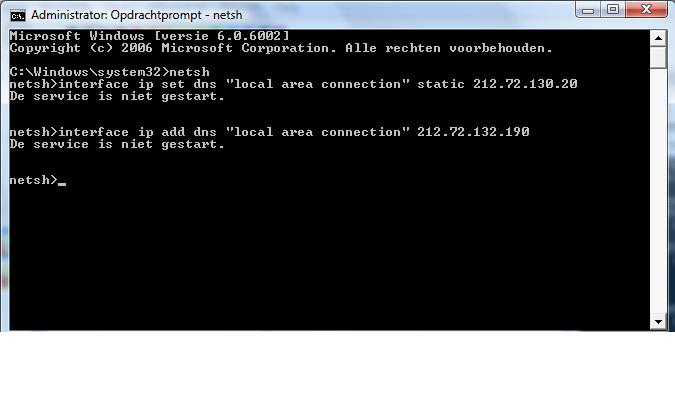
i type in cmd but get an error u know what the problem is?

grtz espritje
Attachments:
Naamloos.jpg
  • LINE71X
  • Beginner
  • Beginner
  • No Avatar
  • Joined: Mar 21, 2008
  • Posts: 53
  • Status: Offline

Post January 10th, 2010, 12:51 am

You're going to get a new ip if your isp uses dhcp dynamic allocation: well at least for me

Mine does and i can get a new ip without trying too hard, All i do is go to windows network settings and put a different ip and save it then go back and click "obtain address automatically and within a minute i have a new ip
  • medilo06
  • Born
  • Born
  • No Avatar
  • Joined: Mar 16, 2010
  • Posts: 1
  • Status: Offline

Post March 16th, 2010, 3:00 pm

http://mycommercialsite.blogspot...com/2010/03/how-to-set-ip-address-subnet-mask.html

This is coded by JOHN IAN R. MEDILO
:dated March 17, 2010 05:35am
:Usage: set address[name][[source=]dhcp| static [addr=]IP address[mask=]IP subnet mask][[geteway=]|none [gwmetric=]integer]"
:netsh interface ip show config

You can also get OPEN DNS. see yah..

netsh interface ip delete dns "Local Area Connection" all
  • KevinPO
  • Born
  • Born
  • No Avatar
  • Joined: Jul 09, 2011
  • Posts: 1
  • Status: Offline

Post July 9th, 2011, 4:25 am

Cmd is great, but I recommend you to use some tool for that. I'm using Maxidix IP Switcher for example, it is the simplest way for fast switching between IP settings. I that the other program Wifi Suite can switch settings even automatically when you connecting to wireless network.

Post Information

  • Total Posts in this topic: 28 posts
  • Users browsing this forum: No registered users and 137 guests
  • You cannot post new topics in this forum
  • You cannot reply to topics in this forum
  • You cannot edit your posts in this forum
  • You cannot delete your posts in this forum
  • You cannot post attachments in this forum


© 2011 Unmelted, LLC. Ozzu® is a registered trademark of Unmelted, LLC.