

Basic PHP Templating mechanism
Having seen many embedded HTML strings in PHP functions I thought it would be helpful to illustrate a really simple straight forward way of implementing a templating engine. This tutorial is broken into 4 sections namely:
- Requirements
- System Design (UML)
- Implementation
- Usage of implementation
Requirements
- Fully functional HTTP server including PHP binaries for that server
- Text Editor
- Web browser capable of rendering the content
System Design
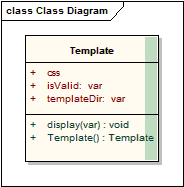
Here is a description of the different variables and functions:
| Variables / Functions | Description |
|---|---|
| css | our css file for the template |
| isValid | unused in this tutorial but might be useful once you get the hang of this to check if the template is valid based on whatever criteria you decide (file location invalid, something not defined etc) |
| templateDir | the path to and including the directory containing our template |
| TemplateDir() | our constructor |
| display(file) | the file to display in our template |
Implementation
Let's define our constructor
function Template(){
  $this->templateDir = "default";
  $this->css = "default.css";
}
Here we define the template dir as "default" which means this, if you are working on file home/mypage.php and including the template file from there, the path to the directory containing the info will be home/default/. So in other words the folder will be relative to the path of the calling file. Next, we define the stylesheet as default.css which means the path is home/default/default.css. Understand? Great let's move on then
function display($file){
  $template = $this;
  error_reporting(E_ALL);
  include_once("template/" . $this->templateDir ."/".$file);
}
Here we set the error reporting level, you might at a later stage want to define some sort of flag that changes the reporting level to suit the environment, like production or development instance. then we include the file according to the directory we specified in the constructor. this path has template prefixing it as I prefer to store my templates in a directory called templates (funny that). So the path would be home/templates/default.
The class in all its glory below
<?php

class Template{

  var $templateDir;
  var $css;
  var $isValid;

  function Template(){
    $this->templateDir  = "default";
    $this->css = "default.css";
  }
  function display($file){
    $template = $this;
    error_reporting(E_ALL);
    include_once("template/" . $this->templateDir ."/".$file);
  }
}

?>
Right everyone with me so far? Great let's define some templates
header.tpl (inside the default folder)
<!DOCTYPE html PUBLIC "-//W3C//DTD XHTML 1.0 Strict//EN" "http://www.w3.org/TR/xhtml1/DTD/xhtml1-strict.dtd">
<html>
<head>
<title>My Template :: <?php echo $template->title; ?></title>
<meta http-equiv="Content-Type" content="text/html; charset=iso-8859-1">
<link href="template/<?php echo $template->templateDir . "/default.css" ?>" rel="stylesheet" type="text/css" />
</head>
<body>
<div>
My Template header <?php echo $template->welcome; ?>
</div>
There we go, save the file and let's proceed to home.tpl in the same directory
<div>
Well hello there <?php echo $template->name; ?><br />
I am so glad you could join me on my <?php echo $template->content; ?><br />
Look here, I have put your name in a textbox <input type='text' id="txtMyName" value="<?php echo $template->name; ?>" /><br />
have a happy day!
</div>
</body>
Cool so now our implementation is done! I have included the text box so you can see that this can be used in data entry forms when editing data.
Usage
Well, I bet you itching to see this right? well even if you're not I am going to show you anyway 😛
Let's assume our PHP page is called mypage.php. The first thing we do is include the template class:
include_once("lib/Template.class.php") // I have saved the template class we added into a dir called lib as file name Template.class.php
The next thing we do is create a reference to the Template object (for those that have worked with classes the correct term is to instantiate an instance Template class):
$oTemplate = new Template();
Right, now we need to populate the variables on the page:
$oTemplate->title = "Check out my template page!";
$oTemplate->welcome = "Howdy doody!";
$oTemplate->name = "Captain Cheese Monkey";
$oTemplate->content = "Here I can put all my html content, whether it be a read from a file or dynamically created content from my super DB";
And we are all done! Here is the complete page mypage.php
<?php
include_once("lib/Template.class.php");

$oTemplate->title = "Check out my template page!";
$oTemplate->welcome = "Howdy doody!";
$oTemplate->name = "Captain Cheese Monkey";
$oTemplate->content = "Here I can put all my html content, whether it be a read from a file or dynamically created content from my super DB";

$oTemplate->display("header.tpl");
$oTemplate->display("home.tpl");
?>
And that as they say in the classics is that. Nice clean and simple. You can extend this from here to the four corners of the planet (it is flat right?) and enjoy time doing the fun things like coding logic as opposed to coding HTML strings!
Conclusion
This is an extremely simple example designed to get you up and running fast. This is by no means a comprehensive solution but is aimed at helping you understand how to separate the logic from your view and how to create nice clean models which allow for easy maintenance and being able to re-use content.
Rabid Dog out.
This page was published on It was last revised on



-
0
lol yeah, only way I can differentiate objects in PHP 😉 Besides in a duck typed language it is the only way to clearly see what the object is LOL. I do however appreciate the fact that you picked it up, had a good chuckle when I read your comment. Made the tutorial worthwhile.
— Rabid Dog
add a comment