Making .ico files such as favicon.ico with Adobe Photoshop

Post February 7th, 2005, 11:23 am

ATNO/TW wrote:
SpooF wrote:
What dimentions do you make favicons?


Going entirely from memory 32x32 or 64x64


They display in the Internet Explorer browser as a 16x16 though, don't they? So it would be safe to make them that size too, though I make mine at 32x32.
  • Anonymous
  • Bot
  • No Avatar
  • Joined: 25 Feb 2008
  • Posts: ?
  • Loc: Ozzuland
  • Status: Online

Post February 7th, 2005, 11:23 am

  • ATNO/TW
  • Super Moderator
  • Super Moderator
  • User avatar
  • Joined: May 28, 2003
  • Posts: 22498
  • Loc: Pittsburgh PA
  • Status: Offline

Post February 7th, 2005, 11:35 am

Correct. For that matter you could also make them 128x128

32x32 trends to be the most common. They will automatically shrink to the 16x16 size, and I think you end up with better resolution by using the larger size vs. 16x16
"The web is a dominatrix. Every where I turn, I see little buttons ordering me to Submit."
Play sports pools and discuss sports topics at Boasting Rights Sports Forum
Get paid to write articles - www.associatedcontent.com
  • danae
  • Born
  • Born
  • User avatar
  • Joined: Mar 17, 2005
  • Posts: 1
  • Loc: ri, usa
  • Status: Offline

Post March 17th, 2005, 10:13 am

thank you so much for that.... it's been massively helpful. thanks again....
  • Truce
  • Guru
  • Guru
  • No Avatar
  • Joined: Apr 25, 2004
  • Posts: 1478
  • Loc: Washington DC
  • Status: Offline

Post April 4th, 2005, 8:31 am

Well, if you go to the download page of that website you will also see he has an icon "packager" if you will. Basically you can create your 64x64 icon and save it....resize it to 32x32 and save it.....resize it to 24x24 and save it......resize it to 16x16 and save it.....resize it to 8x8 and save it.....and then run the packaging utility to turn it into one single icon! That way you get the best quality regardless of what size it is displayed at, and you have an icon for every used size!

Cheers!
  • Wurn
  • Graduate
  • Graduate
  • User avatar
  • Joined: May 19, 2005
  • Posts: 114
  • Loc: Cape Town
  • Status: Offline

Post May 19th, 2005, 5:57 am

Man paying to create a .ico files is just plain wrong. Here we are using Photoshop a package made to create and one cannot make a .ico file until now...

Thx for the tips and using Visual Studio .Net asswell is also a great idea, but i'd prefer Photoshop...
  • lifeanatomy
  • Novice
  • Novice
  • No Avatar
  • Joined: May 18, 2005
  • Posts: 27
  • Loc: England!
  • Status: Offline

Post May 19th, 2005, 10:57 am

god your useful i wasn't even looking for one on here i was about to search google but then i spotted this thread

Post June 16th, 2005, 3:23 pm

Wurn wrote:
Man paying to create a .ico files is just plain wrong. Here we are using Photoshop a package made to create and one cannot make a .ico file until now...

Thx for the tips and using Visual Studio .Net asswell is also a great idea, but i'd prefer Photoshop...


No kidding! I've seen advertisements for custom made ico's seventy five bucks. Outrageous. :shock:

Post June 16th, 2005, 9:56 pm

Great Find! :D

I remember awhile back I was looking for a photoshop plug-in but I couldn't find one and I ended up at http://www.degraeve.com/favicon/. It's a useful site and all, but I didn't want to have to upload my png's all the time. Thanks for that!
  • Jeffrun
  • Born
  • Born
  • No Avatar
  • Joined: Aug 11, 2005
  • Posts: 1
  • Loc: Paris france
  • Status: Offline

Post August 11th, 2005, 3:56 am

Hye overthere !

Is the icons available on safari(mac) ?
Because i did everything, good location and extension staff but nothing appear-Thanks anyway for the tip
:iconthumbright:
  • narven
  • Beginner
  • Beginner
  • User avatar
  • Joined: Jun 06, 2005
  • Posts: 42
  • Status: Offline

Post August 11th, 2005, 10:14 am

use this website

http://www.chami.com/html-kit/services/favicon/

transform any img into a favicon :)
  • scross
  • Born
  • Born
  • No Avatar
  • Joined: Sep 10, 2004
  • Posts: 2
  • Status: Offline

Post July 11th, 2007, 8:24 pm

Bigwebmaster wrote:
I was looking around today on if it was possible to make .ico files with Adobe Photoshop. Before I would always download some free program whenever I needed to make an ico file, as by default Adobe does not. So today I was looking around and found this excellent plugin for Adobe Photoshop that gives you the option to save a file as a .ico

Go here:

http://www.telegraphics.com.au/sw/

For me I had to download the Windows package, which you can also get by clicking here:

http://www.telegraphics.com.au/sw/icofo ... -1.3b3.zip

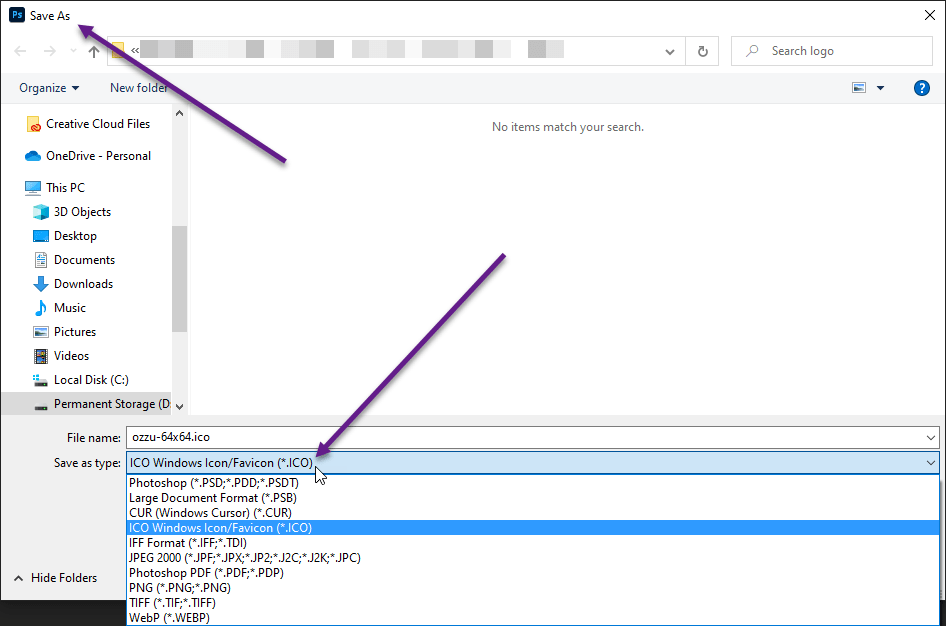
Now all you have to do is extract icoformat.8bi to your plugins folder in adobe. Now the next time you start Adobe you will have the option to save, make, create, and load .ico files!

thanks for these - they were exactly what I needed.

Cheers :lol:
  • corl
  • Newbie
  • Newbie
  • No Avatar
  • Joined: Sep 20, 2008
  • Posts: 5
  • Status: Offline

Post September 24th, 2008, 10:20 pm

But how about the CS3???
"all versions of Photoshop (3.0-7.0, CS, CS2), under Mac OS X, 9 and earlier, and Windows", except for CS3......
  • ATNO/TW
  • Super Moderator
  • Super Moderator
  • User avatar
  • Joined: May 28, 2003
  • Posts: 22498
  • Loc: Pittsburgh PA
  • Status: Offline

Post September 24th, 2008, 10:29 pm

here
http://www.marcofolio.net/webdesign/how ... bsite.html

The plugin download is still here
http://telegraphics.com.au/sw/

It obviously has been revised to work with CS3 (sorry I can't test it - have CS2 -- Im really surprised Adobe just didn't incorporate it i CS3)
Quote:
If you have Adobe Photoshop, you can use this ICO plugin for Photoshop. Download the ICO (Windows Icon) Format and extract the ZIP-archive. Next, put the plug-in called ICOFormat.8bi in the following directory;
C:\Program Files\Adobe\Adobe Photoshop CS3\Plug-Ins\File Formats\
Now start up Photoshop and create a new file with the width and height of 16 x 16 pixels.
Unleash your designing skills to create the Favicon and when you're done, go to "File", "Save as..." (Shift + Ctrl + S).
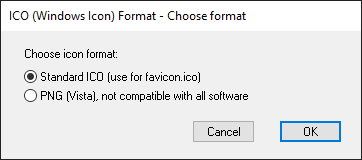
Name your file "favicon.ico" and set the format to "ICO (Windows Icon) (*.ICO)".
"The web is a dominatrix. Every where I turn, I see little buttons ordering me to Submit."
Play sports pools and discuss sports topics at Boasting Rights Sports Forum
Get paid to write articles - www.associatedcontent.com
  • corl
  • Newbie
  • Newbie
  • No Avatar
  • Joined: Sep 20, 2008
  • Posts: 5
  • Status: Offline

Post September 24th, 2008, 10:58 pm

I tried with my CS3, but it doesn't work, it only added an option for portable bitmap.
  • ATNO/TW
  • Super Moderator
  • Super Moderator
  • User avatar
  • Joined: May 28, 2003
  • Posts: 22498
  • Loc: Pittsburgh PA
  • Status: Offline

Post September 24th, 2008, 11:37 pm

well an ico file is nothing more than a bitmap. You certain the .ico extension isn't there on save as dropdown?
"The web is a dominatrix. Every where I turn, I see little buttons ordering me to Submit."
Play sports pools and discuss sports topics at Boasting Rights Sports Forum
Get paid to write articles - www.associatedcontent.com
  • Anonymous
  • Bot
  • No Avatar
  • Joined: 25 Feb 2008
  • Posts: ?
  • Loc: Ozzuland
  • Status: Online

Post September 24th, 2008, 11:37 pm

Post Information

  • Total Posts in this topic: 33 posts
  • Users browsing this forum: No registered users and 109 guests
  • You cannot post new topics in this forum
  • You cannot reply to topics in this forum
  • You cannot edit your posts in this forum
  • You cannot delete your posts in this forum
  • You cannot post attachments in this forum


© Unmelted Enterprises 1998-2009. Driven by phpBB © 2001-2009 phpBB Group.