
Created
Viewed
153 times

This update will be rather small as summer projects are continuing to eat up most of my free time, however, those will be all wrapping up shortly as we move forward into the Fall of 2022. No new features or anything of importance that you will notice, mostly just security-related changes.

August's Full List of Changes

  • Added noopener and noreferrer to prevent external website tab abuse #2166
  • Added stripe.js to be allowed under our Content Security Policy #2169
  • Disabled X-XSS-Protection Header which is no longer best practice #2167

Upcoming Plans

Mark and I discussed briefly the informal chat system. Currently, Ozzu has elected to link to the Telegram service for this, but it does not appear anybody is interested in using this APP. With that said, and unless something changes before I start on that project, I will likely be building a dedicated chat service specifically for Ozzu which does not require any external 3rd party apps to be installed. The chat will be a group-based chat, initially probably one global channel for everyone to participate in, and be tied into the notification system so that you can receive real-time alerts via email, push, or bell notifications. It will be informal and allow discussions on anything that someone wants to bring up where a dedicated thread might not be appropriate. For example, we can discuss anything related to Ozzu, ideas for the future, random quick questions and answers, etc. The chat will require participants to be logged in and will be private in the sense that the discussion will not be open to being indexed by Google (since you will be required to be logged in to see anything).

Second, integrating the market is a top priority, so resources will be dedicated to getting something implemented here. I will have more news regarding the market later.

Lastly potentially having a new section available to developers and content creators to utilize Artificial Intelligence (AI) to help them create anything from emails, marketing information, product summaries, blog posts, birthday/Christmas cards, letters to wife/husband/girlfriend/boyfriend, etc. Due to underlining costs, this will likely not be free, but affordable. You can think of these AI tools as AI Assistants in that while they could do quite a bit in helping you create content, you will still want to proofread and fine-tune any work created by them. These will be based on GPT-3 Models, currently, the most advanced the world has to offer. I have played around with these models a bit, and it really is quite mind-boggling how advanced these AI models are and what they could potentially do for you to assist you with any sort of content creation.


Potential new AI Tools section for Ozzu

add a comment
1

5 Replies

  • Votes
  • Oldest
  • Latest
Replied
Updated

I just want to take a moment to thank you for all of your work to make this happen. Being one of the oldest members of Ozzu, I've seen where it started to what it's become, and what it's going to be. I watched you struggle between real life and keeping Ozzu going, and totally appreciate the effort you made to get V2 up and running. So, a big Thank You!

add a comment
1
Replied
Updated

Just a thought. You know how Facebook and other sites refresh the page automatically to see new notifications? It would help to see it here. I find I have to refresh the page every time I come here to see new notifications.

  • 1
    It actually does, or is supposed to do that to some degree. I have noticed a few irregularities though around real time notifications and will need to look into that more. — Brian Wozeniak
  • 0
    An example: This morning I came on and it showed I had 1 notification. When I checked and the page refreshed, it was only then that I saw there were 4 items in the review queue. — Mark Bowker
  • 0
    And to clarify, the browser tab with Ozzu was left open all night, correct? You simply returned and the notification count was incorrect until you either refreshed or navigated to a new page. Am I following correctly? — Brian Wozeniak
  • 0
    You have it exactly correct. That is precisely what I did. It seems to be that it's mostly the review queue that is not updating without a page refresh. — Mark Bowker
  • 0
    I will make a task to look into this further, definitely not intended to work this way, so a bug. — Brian Wozeniak
  • 1
    For reference, I'm using Edge mostly (Windows 11), but seems to be the same for FF when I'm on my laptop (Windows 10). — Mark Bowker
  • 1
    One last example: I just came back to the OZZU tab and it showed no notifications and nothing in the review queue. I refreshed the page and it showed 6 new notifications. — Mark Bowker
  • 0
    Great thanks for the clarifications, I think I have enough information to try and debug/fix this. Appreciate it! — Brian Wozeniak
  • 0
    Just an update that I think I located the issue being: Unable to create HTML for Post Created Event: Metric suffix converter accept only numeric values. Looks like a bug was causing the event/listener logic from happening which is where the real-time notifications originate from. Should have the fix out shortly here for this to see if this has improved. — Brian Wozeniak
  • 0
    This should be fixed now btw. The notifications and review queues numbers should all update in real time no matter how many Ozzu tabs you have open. Try and pay attention to see if its working properly now! — Brian Wozeniak
  • 0
    Not working in Edge (only one I've checked so far) had to refresh the page to see notifications update just now. — Mark Bowker
  • 0
    Hmm, curious how Chrome/Firefox work for you then. Make sure all of your browsers refreshed Ozzu before trying this, as any old instances before this update would still not work properly. — Brian Wozeniak
  • 0
    I'll keep monitoring, but, define "refreshed Ozzu". I keep Edge open on my main computer except for when I am rebooting or updating Edge. And OZZU is a tab that is always open. When I "refresh" I either hit the F5 key, or I click the OZZU logo in top left to refresh the page. Now granted, sometimes, I'll notice that the tab is sleeping as I noted in the screen shot in a prior post. It only comes out of sleep when I refresh the page. I think the sleep thing could be what's deterring the real time updates to notifications and review queue to be honest. — Mark Bowker
  • 0
    I just meant to make sure that the page was refreshed (F5) at least once since I had mentioned the above message. With that said, before your last post I opened Ozzu in all browsers: Chrome, Firefox, and Edge. I did receive the real time update correctly in both Chrome and Firefox. You are correct, with Edge I did not. I will need to look more into Edge to see what might be going on there. — Brian Wozeniak
  • 0
    Yeah, now, I did see the real time update for Edge of the post you just made while I was in this thread. I really believe it's when the tab goes to sleep that I don't get it. Although Edge is based on the Chrome engine, MS seems to have added its own twist to things. For example, I have many tabs open that those pages constantly refresh ads on their pages. Those tabs never go to sleep because they are constantly being refreshed, unlike OZZU. For reference I don't have this issue with for example on Facebook. If I have new notifications there, they always refresh. — Mark Bowker
  • 0
    I also just confirmed, this time I left Edge actively open and the real time notification showed. I believe you are correct with sleeping tabs and Edge. I will do some testing around the sleep stuff and see if there is a way to overcome that with Edge. With Chrome/FF it works regardless if the tab is hidden / not active or not from the tests I just did. — Brian Wozeniak
  • 0
    Yes. Your last post updated on the main page in real time for me, but the tab was not asleep. Here's an overview to get you started. Looks like end users can control the tab sleep setting but by default looks like they've changed it to sleep inactive tabs after 5 minutes. https://blogs.windows.com/msedgedev/2020/12/09/sleeping-tabs-beta-performance/ — Mark Bowker
  • 0
    So it sounds like the immediate solution for you is to disable that sleeping feature. If you do that, can you verify that solves the issue? That would also confirm what it is for me, and possibly allow me to research if there are an viable solutions around that problem, or if it is what it is at this point. — Brian Wozeniak
  • 0
    This also explains how to disable sleeping tabs just for a single website: https://techcommunity.microsoft.com/t5/articles/sleeping-tabs-faq/m-p/1705434 — Brian Wozeniak
  • 0
    Yes. Just found that also. For now, I've disabled sleeping tabs and see how that goes. If that works, I'll try the add specific sites option. — Mark Bowker
add a comment
0
Replied
Updated

Some additional info that might help troubleshooting the new notifications refresh. A little background is before getting my new computer I used FF and Chrome pretty exclusively. But with my new computer I use MS Edge and noticed this today on Edge.

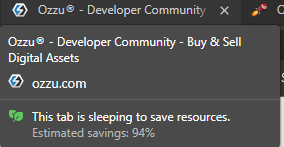
Tab sleeping

Is it possible that this "Tab is sleeping to save resources" could be why I have to refresh Ozzu to see new notifications?

  • 0
    It's possible, I will know more once I start on this task which I have not done yet. However, this information could be helpful when I am exploring trying to duplicate this consistently. — Brian Wozeniak
  • 1
    For your reference to see this message I simply hovered my mouse in the middle of the OZZU tab I had open in Edge — Mark Bowker
add a comment
1
Replied
Updated

While Chrome and Firefox both work correctly with real-time notifications via web-sockets, Microsoft Edge may not due to a feature which puts the browser tabs in sleep mode.

Luckily you can tweak these settings by doing the following:

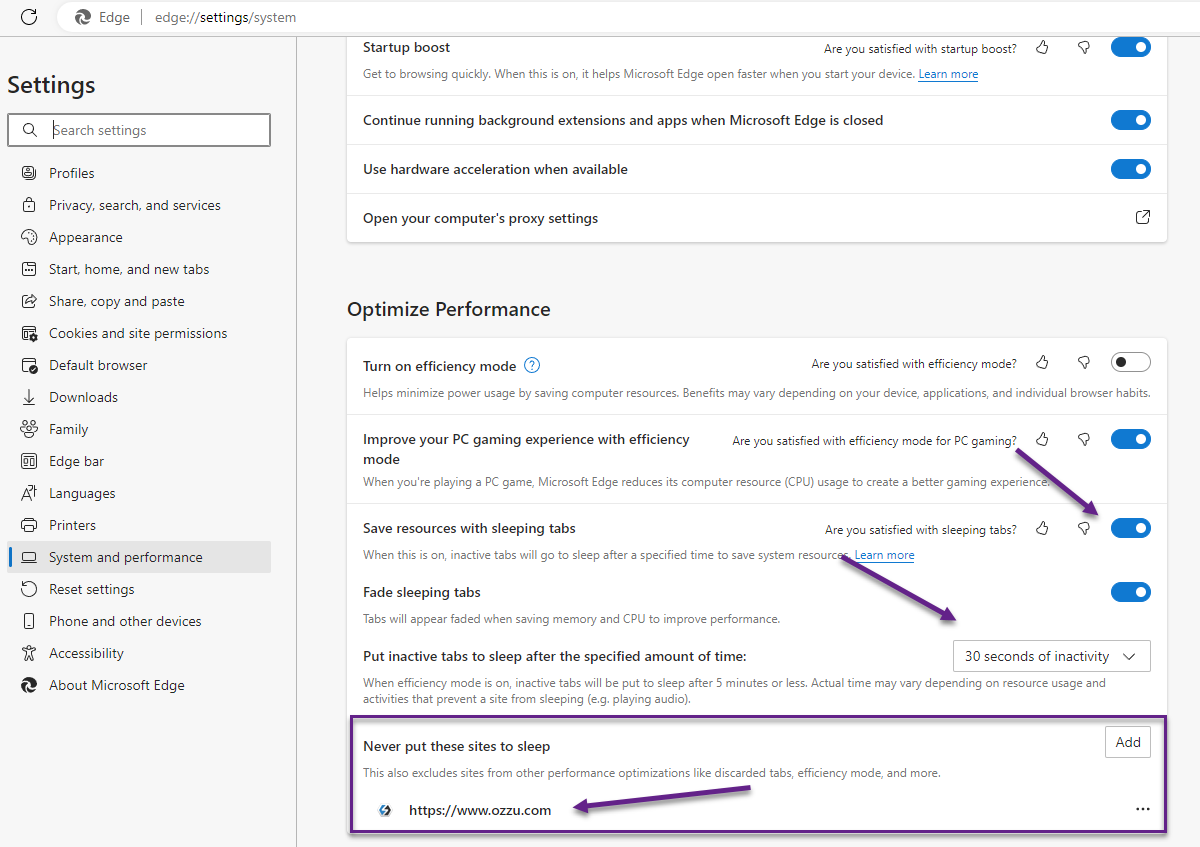
  1. Open up Microsoft Edge Browser
  2. In the Edge address bar type: edge://settings/system
  3. Scroll down to Optimize Performance
  4. In the section labeled Never put these sites to sleep, add https://www.ozzu.com

You can also completely disable sleeping tabs by toggling the option labeled Save resources with sleeping tabs. If you don't want to completely disable sleeping tabs you can also increase the amount of time before they goto sleep with the option labeled Put inactive tabs to sleep after the specified amount of time.

Disable sleeping tabs for Microsoft Edge

  • 1
    This is now working correctly in Edge for me using either method. Kind of sucks it's a user setting that has to be made, but that's MS for you. — Mark Bowker
  • 0
    Yeah, I will still research to figure out a way to fight this automatically so user's won't have to do this. However, majority of our visitors use Chrome, so thankfully this won't be an issue for most. With that said I am still glad you brought this up as while Edge's sleeping tabs was definitely an issue, there were actually bugs that I had to resolve as well because it wasn't working in any browser lately. All should be good now though. — Brian Wozeniak
  • 0
    Update to this. I had added to never sleep ozzu.com per your instructions. When I came on this morning I had to refresh the page to see new review queue notifications (note: my computer and the tab did not go to sleep overnight). I edited the entry to be https://www.ozzu.com and the latest notifications updated in real time without having to refresh. — Mark Bowker
  • 0
    Oh interesting, so it need the full https URL path in the Never put these sites to sleep section? Little confused though, you said it did not go to sleep overnight? — Brian Wozeniak
  • 0
    I changed my settings so tabs would goto sleep after 30 seconds, and confirmed you were correct that my site exception was not working. I then changed it to the full URL that included the scheme, and tested again. This time other tabs fell asleep while Ozzu did not. I have updated my screenshot on this post to reflect the correct settings. — Brian Wozeniak
  • 1
    Yes, appears to need the full URL. When I came back to the tab just now I saw your new notifications without having to refresh — Mark Bowker
  • 1
    It just worked again correctly when you upvoted my last post. — Mark Bowker
  • 0
    Great, thanks for verifying for me. — Brian Wozeniak
  • 1
    I was able to write some additional code to help mitigate the problem for users who use Edge and have not added Ozzu to the exception list. The preferred solution is to still have Ozzu on the exception list so that the tab won't goto sleep, but for those who do not when you click on the tab for Ozzu it will detect that its visible again and will automatically refresh the notification and review queue counts, and also reconnect to websockets for real time notifications again; all without having to hit the refresh button. — Brian Wozeniak
add a comment
1
Replied
Updated

After a few days, I can confirm this has been working perfectly on MS Edge!

add a comment
1

User

Community

Market

Help Center

Legal

Company

Connect