TUTORIAL: Pour deux colonnes de taille similaire (Tous les CSS)

  • Bogey
  • Bogey
  • Genius
  • Avatar de l’utilisateur
  • Inscription: Juil 14, 2005
  • Messages: 8211
  • Loc: USA
  • Status: Offline

Message Novembre 29th, 2008, 10:26 pm

Introduction


Ce tutoriel vous montre comment créer deux colonnes avec des tailles de style :D

Skeleton


L'attribut le plus important utilisé pour le CSS dans ce tutoriel est le position attribut. Il ya quelques valeurs différentes qui peuvent être appliquées à l'attribut (par ordre alphabétique):

  • Absolute
  • Fixe
  • Hériter
  • Relative
  • Static

Ceux que nous auraient recours sont en gras dans la liste.

Si vous mettez un div relative à l'intérieur une div absolue et définir une hauteur (et si les deux divs sont flottants), ce serait aller à une hauteur associatif pour l'élément de page qui efface la page.

Considérez ce qui suit CSS et HTML

Code: [ Select ]
<!DOCTYPE html PUBLIC "-//W3C//DTD XHTML 1.0 Strict//EN"
   "http://www.w3.org/TR/xhtml1/DTD/xhtml1-strict.dtd">
<html xmlns="http://www.w3.org/1999/xhtml" lang="en" xml:lang="en">
<head>
<title>Bogey</title>
<style type="text/css">
<!--
body {
    background-color: #4D4D4D;
    margin: 1% 0% 0% 0%;
}
.container {
    position: relative;
    width: 100%;
}
.header {
    width: 90%;
    margin: 0 auto;
    height: 50px;
    background-color: #645C5A;
    border: solid 5px #5A5450;
    margin-bottom: 1%;
}
.header h1 {
    text-align: center;
    color: #B8ABA3;
    margin: 0px;
    font-size: 2em;
}
.left {
    position: absolute;
    background-color: #7B6F69;
    width: 16%;
    height: 100%;
    border: solid 5px #716860;
    float: left;
    margin-left: 1%;
    padding-left: 5px;
    padding-right: 5px;
}
.left p {
    margin-top: 0%;
}
.right {
    margin-right: 1%;
    width: 77%;
    background-color: #AB9D91;
    border: solid 5px #716860;
    float: right;
    padding-left: 5px;
    padding-right: 5px;
    margin-bottom: 1%;
}
.right p {
    margin-top: 0%;
}
.footer {
    margin: 0 1%;
    text-align: center;
    background-color: #7B6F69;
    border: solid 5px #716860;
)
.footer p {
    margin-top: 0px;
    margin-bottom: 0px;
}
-->
</style>
</head>
<body>
    <div class="header">
        <h1>Bogey - The Ozzunian</h1>
    </div>
    <div class="container">
        <div class="left">
            <p>Hi</p>
            <p>Bye</p>
        </div>
        <div class="right">
            <p>Hi</p>
            <p>Some text</p>
            <p>Some more text</p>
            <p>More testing text</p>
            <p>The last piece of text</p>
            <p>bye</p>
        </div>
        <p style="clear: both;" />
    </div>
    <div class="footer">
        <p>Copyright Information</p>
    </div>
</body>
</html>
  1. <!DOCTYPE html PUBLIC "-//W3C//DTD XHTML 1.0 Strict//EN"
  2.    "http://www.w3.org/TR/xhtml1/DTD/xhtml1-strict.dtd">
  3. <html xmlns="http://www.w3.org/1999/xhtml" lang="en" xml:lang="en">
  4. <head>
  5. <title>Bogey</title>
  6. <style type="text/css">
  7. <!--
  8. body {
  9.     background-color: #4D4D4D;
  10.     margin: 1% 0% 0% 0%;
  11. }
  12. .container {
  13.     position: relative;
  14.     width: 100%;
  15. }
  16. .header {
  17.     width: 90%;
  18.     margin: 0 auto;
  19.     height: 50px;
  20.     background-color: #645C5A;
  21.     border: solid 5px #5A5450;
  22.     margin-bottom: 1%;
  23. }
  24. .header h1 {
  25.     text-align: center;
  26.     color: #B8ABA3;
  27.     margin: 0px;
  28.     font-size: 2em;
  29. }
  30. .left {
  31.     position: absolute;
  32.     background-color: #7B6F69;
  33.     width: 16%;
  34.     height: 100%;
  35.     border: solid 5px #716860;
  36.     float: left;
  37.     margin-left: 1%;
  38.     padding-left: 5px;
  39.     padding-right: 5px;
  40. }
  41. .left p {
  42.     margin-top: 0%;
  43. }
  44. .right {
  45.     margin-right: 1%;
  46.     width: 77%;
  47.     background-color: #AB9D91;
  48.     border: solid 5px #716860;
  49.     float: right;
  50.     padding-left: 5px;
  51.     padding-right: 5px;
  52.     margin-bottom: 1%;
  53. }
  54. .right p {
  55.     margin-top: 0%;
  56. }
  57. .footer {
  58.     margin: 0 1%;
  59.     text-align: center;
  60.     background-color: #7B6F69;
  61.     border: solid 5px #716860;
  62. )
  63. .footer p {
  64.     margin-top: 0px;
  65.     margin-bottom: 0px;
  66. }
  67. -->
  68. </style>
  69. </head>
  70. <body>
  71.     <div class="header">
  72.         <h1>Bogey - The Ozzunian</h1>
  73.     </div>
  74.     <div class="container">
  75.         <div class="left">
  76.             <p>Hi</p>
  77.             <p>Bye</p>
  78.         </div>
  79.         <div class="right">
  80.             <p>Hi</p>
  81.             <p>Some text</p>
  82.             <p>Some more text</p>
  83.             <p>More testing text</p>
  84.             <p>The last piece of text</p>
  85.             <p>bye</p>
  86.         </div>
  87.         <p style="clear: both;" />
  88.     </div>
  89.     <div class="footer">
  90.         <p>Copyright Information</p>
  91.     </div>
  92. </body>
  93. </html>


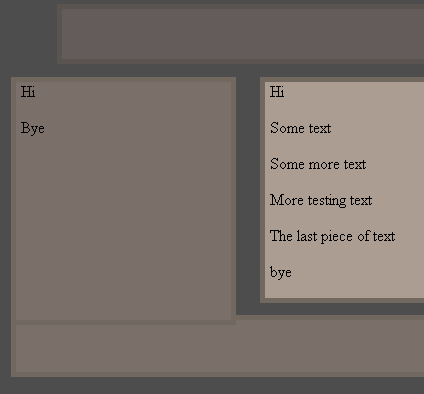
Qui produirait:

Attachments:
bogey_tut.PNG

Tutorial Example


Son type de correctif qui nécessite des compromis et pourrait fournir un certain effet intéressant si vous avez assez d'imagination.

Si vous ne voulez pas de compromis, alors vous pourriez visiter cet tutoriel.
"Bring forth therefore fruits meet for repentance:" Matthew 3:8
  • Anonymous
  • Bot
  • No Avatar
  • Inscription: 25 Feb 2008
  • Messages: ?
  • Loc: Ozzuland
  • Status: Online

Message Novembre 29th, 2008, 10:26 pm

Afficher de l'information

  • Total des messages de ce sujet: 1 message
  • Modérateur: Tutorial Writers
  • Utilisateurs parcourant ce forum: Aucun utilisateur enregistré et 8 invités
  • Vous ne pouvez pas poster de nouveaux sujets
  • Vous ne pouvez pas répondre aux sujets
  • Vous ne pouvez pas éditer vos messages
  • Vous ne pouvez pas supprimer vos messages
  • Vous ne pouvez pas joindre des fichiers


© 2011 Unmelted, LLC. Ozzu® est une marque déposée de Unmelted, LLC