Forum rules

Please read our Guide to Making Ozzu Tutorials if you would like to submit your own tutorials.

TUTORIAL: Getting two similar sized columns (All CSS)

  • Bogey
  • Disturbed
  • Genius
  • User avatar
  • Joined: Jul 14, 2005
  • Posts: 7128
  • Loc: Ozzuland
  • Status: Offline

Post November 29th, 2008, 10:26 pm

Introduction


This tutorial would show you how to create two column layout with stylish sizes :D

Skeleton


The most important attribute used for CSS in this tutorial is the position attribute. There are a few different values that can be applied to the attribute (Listed in alphabetical order):

  • Absolute
  • Fixed
  • Inherit
  • Relative
  • Static

The ones we would be using are bold in the list.

If you put a relative div inside an absolute div and define a height (and if both div's are floating), it would go to a height associative to the page element that clears the page.

Consider the following CSS and HTML

Code: [ Download ] [ Select ]
<!DOCTYPE html PUBLIC "-//W3C//DTD XHTML 1.0 Strict//EN"
   "http://www.w3.org/TR/xhtml1/DTD/xhtml1-strict.dtd">
<html xmlns="http://www.w3.org/1999/xhtml" lang="en" xml:lang="en">
<head>
<title>Bogey</title>
<style type="text/css">
<!--
body {
    background-color: #4D4D4D;
    margin: 1% 0% 0% 0%;
}
.container {
    position: relative;
    width: 100%;
}
.header {
    width: 90%;
    margin: 0 auto;
    height: 50px;
    background-color: #645C5A;
    border: solid 5px #5A5450;
    margin-bottom: 1%;
}
.header h1 {
    text-align: center;
    color: #B8ABA3;
    margin: 0px;
    font-size: 2em;
}
.left {
    position: absolute;
    background-color: #7B6F69;
    width: 16%;
    height: 100%;
    border: solid 5px #716860;
    float: left;
    margin-left: 1%;
    padding-left: 5px;
    padding-right: 5px;
}
.left p {
    margin-top: 0%;
}
.right {
    margin-right: 1%;
    width: 77%;
    background-color: #AB9D91;
    border: solid 5px #716860;
    float: right;
    padding-left: 5px;
    padding-right: 5px;
    margin-bottom: 1%;
}
.right p {
    margin-top: 0%;
}
.footer {
    margin: 0 1%;
    text-align: center;
    background-color: #7B6F69;
    border: solid 5px #716860;
)
.footer p {
    margin-top: 0px;
    margin-bottom: 0px;
}
-->
</style>
</head>
<body>
    <div class="header">
        <h1>Bogey - The Ozzunian</h1>
    </div>
    <div class="container">
        <div class="left">
            <p>Hi</p>
            <p>Bye</p>
        </div>
        <div class="right">
            <p>Hi</p>
            <p>Some text</p>
            <p>Some more text</p>
            <p>More testing text</p>
            <p>The last piece of text</p>
            <p>bye</p>
        </div>
        <p style="clear: both;" />
    </div>
    <div class="footer">
        <p>Copyright Information</p>
    </div>
</body>
</html>
  1. <!DOCTYPE html PUBLIC "-//W3C//DTD XHTML 1.0 Strict//EN"
  2.    "http://www.w3.org/TR/xhtml1/DTD/xhtml1-strict.dtd">
  3. <html xmlns="http://www.w3.org/1999/xhtml" lang="en" xml:lang="en">
  4. <head>
  5. <title>Bogey</title>
  6. <style type="text/css">
  7. <!--
  8. body {
  9.     background-color: #4D4D4D;
  10.     margin: 1% 0% 0% 0%;
  11. }
  12. .container {
  13.     position: relative;
  14.     width: 100%;
  15. }
  16. .header {
  17.     width: 90%;
  18.     margin: 0 auto;
  19.     height: 50px;
  20.     background-color: #645C5A;
  21.     border: solid 5px #5A5450;
  22.     margin-bottom: 1%;
  23. }
  24. .header h1 {
  25.     text-align: center;
  26.     color: #B8ABA3;
  27.     margin: 0px;
  28.     font-size: 2em;
  29. }
  30. .left {
  31.     position: absolute;
  32.     background-color: #7B6F69;
  33.     width: 16%;
  34.     height: 100%;
  35.     border: solid 5px #716860;
  36.     float: left;
  37.     margin-left: 1%;
  38.     padding-left: 5px;
  39.     padding-right: 5px;
  40. }
  41. .left p {
  42.     margin-top: 0%;
  43. }
  44. .right {
  45.     margin-right: 1%;
  46.     width: 77%;
  47.     background-color: #AB9D91;
  48.     border: solid 5px #716860;
  49.     float: right;
  50.     padding-left: 5px;
  51.     padding-right: 5px;
  52.     margin-bottom: 1%;
  53. }
  54. .right p {
  55.     margin-top: 0%;
  56. }
  57. .footer {
  58.     margin: 0 1%;
  59.     text-align: center;
  60.     background-color: #7B6F69;
  61.     border: solid 5px #716860;
  62. )
  63. .footer p {
  64.     margin-top: 0px;
  65.     margin-bottom: 0px;
  66. }
  67. -->
  68. </style>
  69. </head>
  70. <body>
  71.     <div class="header">
  72.         <h1>Bogey - The Ozzunian</h1>
  73.     </div>
  74.     <div class="container">
  75.         <div class="left">
  76.             <p>Hi</p>
  77.             <p>Bye</p>
  78.         </div>
  79.         <div class="right">
  80.             <p>Hi</p>
  81.             <p>Some text</p>
  82.             <p>Some more text</p>
  83.             <p>More testing text</p>
  84.             <p>The last piece of text</p>
  85.             <p>bye</p>
  86.         </div>
  87.         <p style="clear: both;" />
  88.     </div>
  89.     <div class="footer">
  90.         <p>Copyright Information</p>
  91.     </div>
  92. </body>
  93. </html>


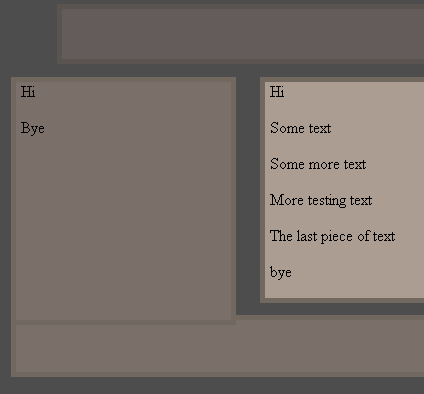
That would produce:

Attachments:
bogey_tut.PNG

Tutorial Example


It's the type of fix that requires compromising and could provide some interesting effect if you are creative enough.

If you don't want to compromise then you could visit this tutorial.
Learn PHP | I got 10 PHP tutorials! Check them out!
Dreamtale - Farewell
Just a note... I've giving up on web development and that stuff... Just lost all interest in it.
  • Anonymous
  • Bot
  • No Avatar
  • Joined: 25 Feb 2008
  • Posts: ?
  • Loc: Ozzuland
  • Status: Online

Post November 29th, 2008, 10:26 pm

  • Bogey
  • Disturbed
  • Genius
  • User avatar
  • Joined: Jul 14, 2005
  • Posts: 7128
  • Loc: Ozzuland
  • Status: Offline

Post July 4th, 2009, 1:07 am

I've made a more elaborate version of this tutorial on my site. I think it makes more sense as to why and how it works like this :)
Learn PHP | I got 10 PHP tutorials! Check them out!
Dreamtale - Farewell
Just a note... I've giving up on web development and that stuff... Just lost all interest in it.

Post Information

  • Total Posts in this topic: 2 posts
  • Moderator: Tutorial Writers
  • Users browsing this forum: No registered users and 3 guests
  • You cannot post new topics in this forum
  • You cannot reply to topics in this forum
  • You cannot edit your posts in this forum
  • You cannot delete your posts in this forum
  • You cannot post attachments in this forum


© Unmelted Enterprises 1998-2009. Driven by phpBB © 2001-2009 phpBB Group.